Contact

ICS – Inventory Control System

A modern, robust and scalable WMS designed for real warehouse operations.

Reduce errors, control your inventory and gain full traceability over every movement.

Real-time warehouse visibility

  • Receiving with PO validation
  • Advanced picking & replenishment
  • History, web reports and dashboards

Executive Summary

ICS is a Warehouse Management System designed for real operations, with intelligent flows, strict validations and complete traceability.

Optimized warehouse operations

From receiving to storage, internal transfers, consumption and picking, ICS guides the operator step by step to reduce errors and increase productivity.

Reliable and auditable

Every movement is recorded with user, date, time, quantities and operation type, providing full traceability for audits and customer requirements.

Modern UX

Tables that feel like Excel, draggable modals and clear error messages make training faster and adoption easier.

Main Modules

ICS covers the complete warehouse lifecycle, from receiving POs to consumption and history analysis.

Technical Details of ICS

Explore the internal tables, validations and logic behind each module.

English

Español

中文

  • ICS – Dashboard Module (Summary)

    The ICS Dashboard provides a simple but effective real‑time overview of key operational metrics across the system. Although intentionally lightweight in its current version, it already delivers essential visibility into product activity, location usage, physical count notes, and movement trends. It is designed to grow and adapt as more modules and analytics are added to the platform.

    Key Metrics Displayed
    The dashboard presents several high‑level indicators that summarize the state of the inventory and system activity:

    1. Product Overview
    • Total number of products registered in the system
    • Active products currently in use
    • Inactive products not being used
    This helps users quickly understand the size and health of the product catalog.

    2. Location Overview
    • Total number of warehouse locations
    • Active locations currently being used
    • Inactive locations reserved for reference or historical purposes
    This provides a snapshot of warehouse capacity and utilization.

    3. Physical Count Notes
    The dashboard highlights whether any notes were added during recent physical counts.
    This allows supervisors to quickly identify items that require review, recounting, or follow‑up.

    4. Inventory Movement Summary
    The dashboard displays:
    • Total movements recorded today in the History module
    • Total movements recorded overall
    This gives immediate visibility into daily activity levels and long‑term operational volume.

    Interactive Charts
    At the bottom of the dashboard, users can visualize movement data through a dynamic chart component.
    The chart supports multiple display modes:
    • Bar Chart
    • Line Chart
    • Pie Chart
    • Doughnut Chart

    These charts are linked directly to the History module and can display:
    • Movements by Type (Inbound, Put Away, Ship, Adjustments, etc.)
    • Movements by User (Today)
    • Movements by User (All Time)
    • Inventory Counts by User
    This allows users to analyze operational patterns, identify workload distribution, and detect unusual activity.

    Current Purpose & Future Expansion
    Although the dashboard is intentionally simple at this stage, it serves as a foundation for future enhancements.
    The long‑term vision is to:
    • Provide module‑specific dashboards
    • Display KPIs for receiving, put‑away, shipping, and cycle counts
    • Integrate alerts, exceptions, and performance indicators
    • Offer customizable widgets for different departments

    For now, the dashboard acts as a clean, centralized snapshot of system activity, giving users a quick understanding of what is happening across ICS.
  • ICS – Módulo de Dashboard (Resumen)

    El Dashboard de ICS proporciona una vista general simple pero efectiva de los principales indicadores operativos en tiempo real. Aunque es intencionalmente ligero en su versión actual, ya ofrece visibilidad esencial sobre la actividad de productos, uso de ubicaciones, notas de conteos físicos y tendencias de movimientos. Está diseñado para crecer y adaptarse a medida que se agregan más módulos y análisis a la plataforma.

    Métricas Principales Mostradas
    El dashboard presenta varios indicadores de alto nivel que resumen el estado del inventario y la actividad del sistema:

    1. Resumen de Productos
    • Total de productos registrados en el sistema
    • Productos activos actualmente en uso
    • Productos inactivos que no se utilizan
    Esto ayuda a los usuarios a entender rápidamente el tamaño y la salud del catálogo de productos.

    2. Resumen de Ubicaciones
    • Total de ubicaciones en el almacén
    • Ubicaciones activas actualmente en uso
    • Ubicaciones inactivas reservadas para referencia o historial
    Esto proporciona una vista rápida de la capacidad y utilización del almacén.

    3. Notas de Conteos Físicos
    El dashboard muestra si se agregaron notas durante conteos físicos recientes.
    Esto permite a los supervisores identificar rápidamente artículos que requieren revisión, recuento o seguimiento.

    4. Resumen de Movimientos de Inventario
    El dashboard muestra:
    • Movimientos registrados hoy en el módulo de History
    • Movimientos registrados en total
    Esto brinda visibilidad inmediata sobre los niveles de actividad diaria y el volumen operativo a largo plazo.

    Gráficas Interactivas
    En la parte inferior del dashboard, los usuarios pueden visualizar datos de movimientos mediante un componente de gráficas dinámicas.
    Las gráficas soportan múltiples modos de visualización:
    • Gráfica de Barras
    • Gráfica de Líneas
    • Gráfica de Pastel
    • Gráfica de Dona

    Estas gráficas están vinculadas directamente al módulo de History y pueden mostrar:
    • Movimientos por Tipo (Inbound, Put Away, Ship, Ajustes, etc.)
    • Movimientos por Usuario (Hoy)
    • Movimientos por Usuario (Todo el Tiempo)
    • Conteos de Inventario por Usuario
    Esto permite analizar patrones operativos, identificar distribución de carga de trabajo y detectar actividad inusual.

    Propósito Actual y Expansión Futura
    Aunque el dashboard es intencionalmente simple en esta etapa, sirve como base para futuras mejoras.
    La visión a largo plazo incluye:
    • Proveer dashboards específicos por módulo
    • Mostrar KPIs para receiving, put‑away, shipping y conteos
    • Integrar alertas, excepciones e indicadores de rendimiento
    • Ofrecer widgets personalizables para diferentes departamentos

    Por ahora, el dashboard funciona como una vista centralizada y clara de la actividad del sistema, brindando a los usuarios una comprensión rápida de lo que ocurre en ICS.
  • ICS – 仪表板模块(摘要)

    ICS 仪表板提供一个简单但高效的实时视图,用于展示系统中的关键运营指标。虽然当前版本设计得较为轻量,但已经能够清晰呈现产品活动、库位使用情况、盘点备注以及库存移动趋势。该模块旨在随着更多功能与分析工具的加入而不断扩展与优化。

    主要显示的指标
    仪表板展示多个高层级指标,用于概括库存状态与系统活动:

    1. 产品概览
    • 系统中注册的产品总数
    • 当前使用中的活跃产品
    • 未使用的非活跃产品
    帮助用户快速了解产品目录的规模与健康状况。

    2. 库位概览
    • 仓库库位总数
    • 当前使用中的活跃库位
    • 保留用于参考或历史的非活跃库位
    提供仓库容量与利用率的即时快照。

    3. 盘点备注
    仪表板会显示最近盘点中是否添加了备注。
    帮助主管快速识别需要复查、复点或跟进的项目。

    4. 库存移动摘要
    仪表板显示:
    • 今日在 History 模块中记录的移动总数
    • 系统中累计记录的移动总数
    提供对每日活动水平与长期操作量的即时可视化。

    互动图表
    在仪表板底部,用户可以通过动态图表组件查看库存移动数据。
    图表支持多种显示模式:
    • 柱状图(Bar Chart)
    • 折线图(Line Chart)
    • 饼图(Pie Chart)
    • 圆环图(Doughnut Chart)

    这些图表直接连接到 History 模块,可显示:
    • 按类型分类的移动(入库、上架、出库、调整等)
    • 按用户分类的移动(今日)
    • 按用户分类的移动(全部时间)
    • 按用户分类的库存盘点数量
    帮助用户分析操作模式、识别工作量分布并发现异常活动。

    当前用途与未来扩展
    虽然仪表板目前较为简洁,但它是未来增强功能的基础。
    长期规划包括:
    • 提供模块级仪表板
    • 显示收货、上架、出库与盘点的 KPI
    • 集成警报、异常与绩效指标
    • 为不同部门提供可自定义组件

    目前,仪表板作为系统活动的集中快照,为用户提供快速、清晰的整体视图,帮助他们了解 ICS 中正在发生的情况。
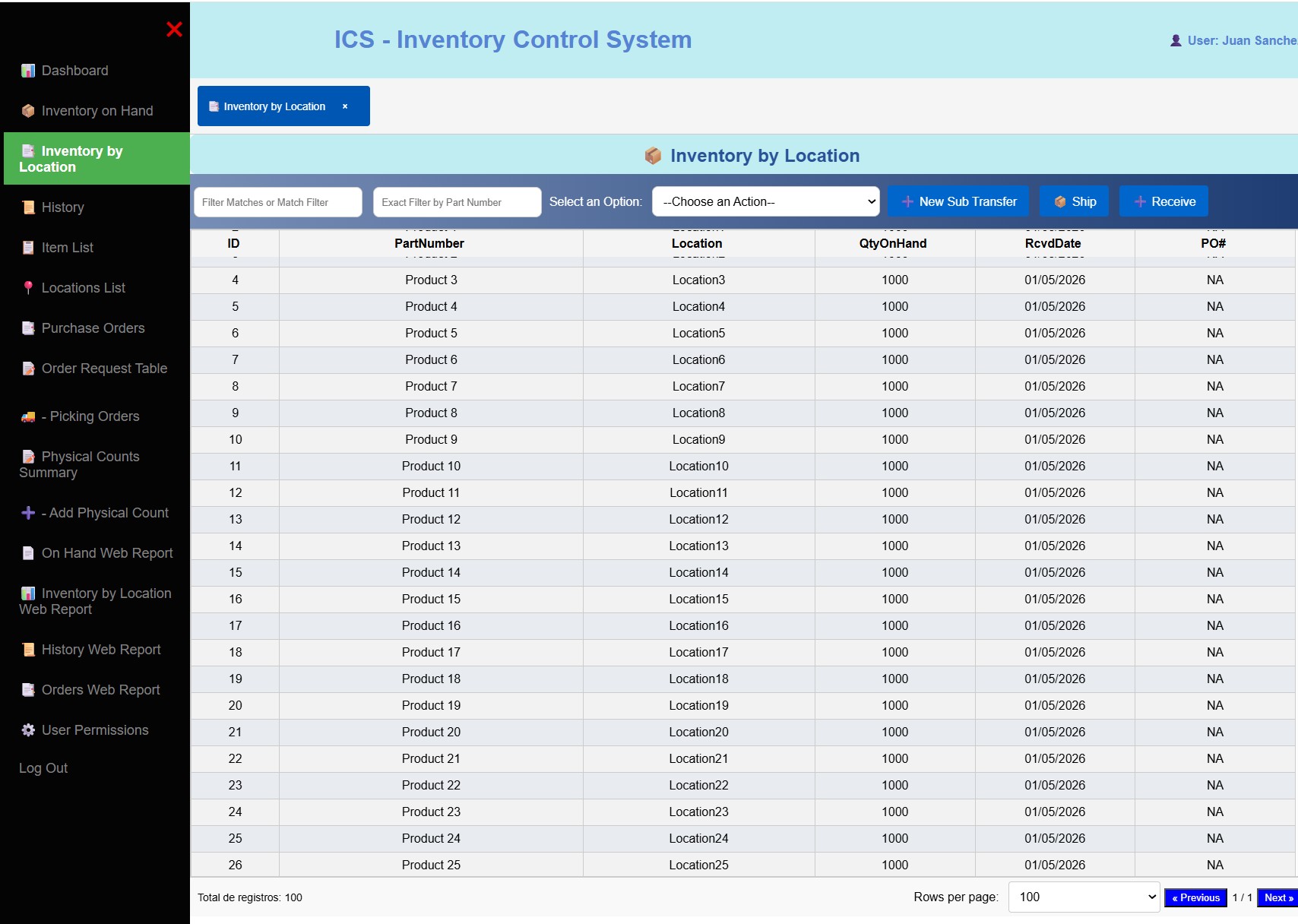
  • ICS – Inventory On‑Hand Module (Summary)

    The Inventory On‑Hand module provides a fast, interactive, and highly visual way to understand real‑time stock levels across the operation. It is designed to behave like a modern spreadsheet—intuitive, responsive, and optimized for high‑volume warehouse environments.

    Key Capabilities

    Real‑time quantity tracking
    Continuously updated on‑hand balances ensure operators always see the most accurate inventory levels.

    Quick Filters & Advanced Filters
    Users can instantly narrow results using simple quick filters or apply multi‑criteria advanced filters for deeper analysis.

    Excel‑like Interaction
    The table supports row selection with full‑row highlighting and active‑cell focus, mimicking the familiar behavior of Microsoft Excel. This makes navigation and data review extremely fast for warehouse teams.

    Hover Interaction
    Rows respond visually when the mouse passes over them, improving readability and reducing selection errors.

    Export Tools
    Inventory data can be exported directly to Excel or CSV, enabling offline analysis, reporting, or integration with other systems.

    Web Report Integration
    A built‑in web report allows users to generate structured inventory reports based on different criteria, supporting audits, cycle counts, and operational reviews.

    Data Fields Included
    The module displays all essential inventory attributes in a single, clean view:

    • Part Number
    • Description
    • Unit of Measure (U/M)
    • Monthly Usage
    • Status
    • Quantity On Hand
    • Months of Inventory Available
  • ICS – Módulo de Inventario Disponible (Resumen)

    El módulo de Inventario Disponible proporciona una forma rápida, interactiva y altamente visual de comprender los niveles de inventario en tiempo real dentro de la operación. Está diseñado para comportarse como una hoja de cálculo moderna: intuitiva, responsiva y optimizada para entornos de almacén con alto volumen de datos.

    Capacidades Principales

    Seguimiento de cantidades en tiempo real
    Los niveles de inventario se actualizan continuamente, asegurando que los operadores siempre vean la información más precisa.

    Filtros Rápidos y Filtros Avanzados
    Los usuarios pueden reducir los resultados al instante usando filtros rápidos o aplicar filtros avanzados con múltiples criterios para un análisis más profundo.

    Interacción estilo Excel
    La tabla permite seleccionar filas con resaltado completo y enfoque en la celda activa, imitando el comportamiento familiar de Microsoft Excel. Esto hace que la navegación y revisión de datos sea extremadamente rápida para los equipos de almacén.

    Interacción Hover
    Las filas responden visualmente cuando el mouse pasa sobre ellas, mejorando la legibilidad y reduciendo errores de selección.

    Herramientas de Exportación
    Los datos de inventario pueden exportarse directamente a Excel o CSV, permitiendo análisis fuera de línea, reportes o integración con otros sistemas.

    Integración con Reporte Web
    Un reporte web integrado permite generar informes estructurados basados en diferentes criterios, apoyando auditorías, conteos cíclicos y revisiones operativas.

    Campos de Datos Incluidos
    El módulo muestra todos los atributos esenciales del inventario en una vista limpia y unificada:

    • Número de Parte
    • Descripción
    • Unidad de Medida (U/M)
    • Uso Mensual
    • Estatus
    • Cantidad Disponible
    • Meses de Inventario Disponible
  • ICS – 库存现有量模块(摘要)

    库存现有量模块提供一种快速、互动且高度可视化的方式,用于了解操作过程中的实时库存水平。该模块的设计类似于现代电子表格——直观、响应迅速,并针对高数据量的仓储环境进行了优化。

    主要功能

    实时数量追踪
    库存数量会持续更新,确保操作人员始终看到最准确的库存水平。

    快速筛选与高级筛选
    用户可以使用简单的快速筛选立即缩小结果范围,或使用多条件高级筛选进行更深入的分析。

    类 Excel 交互方式
    表格支持整行选中、高亮显示以及活动单元格聚焦,模拟 Microsoft Excel 的熟悉操作方式,使仓库团队能够更快速地浏览和审查数据。

    悬停交互
    当鼠标经过行时,行会产生视觉反馈,提高可读性并减少选择错误。

    导出工具
    库存数据可直接导出为 Excel 或 CSV,方便离线分析、报告或与其他系统集成。

    网页报表集成
    内置的网页报表允许用户根据不同条件生成结构化的库存报告,支持审计、循环盘点和运营审查。

    包含的数据字段
    模块在一个简洁的界面中展示所有关键库存属性:

    • 物料编号
    • 描述
    • 计量单位 (U/M)
    • 月使用量
    • 状态
    • 现有库存数量
    • 可用库存月份
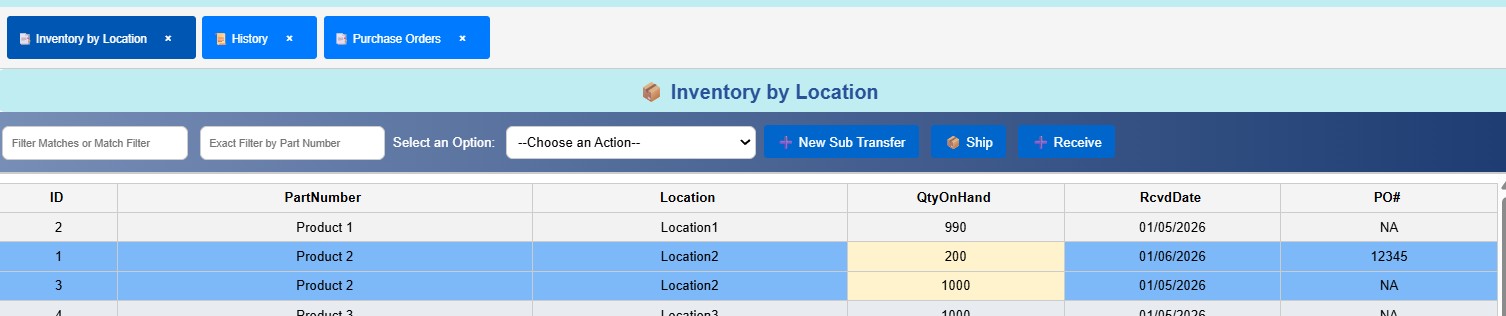
  • ICS – Inventory by Location Module (Summary)

    The Inventory by Location module provides a detailed, real‑time view of stock distribution across every warehouse location. It is designed for operational accuracy, fast navigation, and high‑volume transaction processing, combining spreadsheet‑like usability with strict WMS‑grade validations.

    Key Capabilities

    Quick Filters & Advanced Filters
    Users can instantly narrow results or apply multi‑criteria filtering to analyze inventory by part, location, status, or any other attribute.

    Excel‑Style Interaction
    The table behaves like a modern spreadsheet:
    • Full‑row highlight when selected
    • Active‑cell highlight showing the exact clicked cell
    • Smooth hover effects for fast scanning
    This makes the interface extremely intuitive for warehouse operators.

    Export Tools
    Inventory can be exported to Excel or CSV for reporting, audits, or external analysis.

    Bulk Import Tools
    • Full inventory replacement during physical counts
    • Mass inventory adjustments without manual entry
    These tools dramatically reduce time and eliminate human error during large updates.

    Operational Functions (Real‑Time & Validated)
    This module is not just a table — it is an operational engine. It includes several real‑time inventory actions:

    Sub‑Transfer (Location‑to‑Location Movement)
    Move material from one location to another with automatic adjustments to both source and destination.
    Every movement is validated and recorded in the system history.

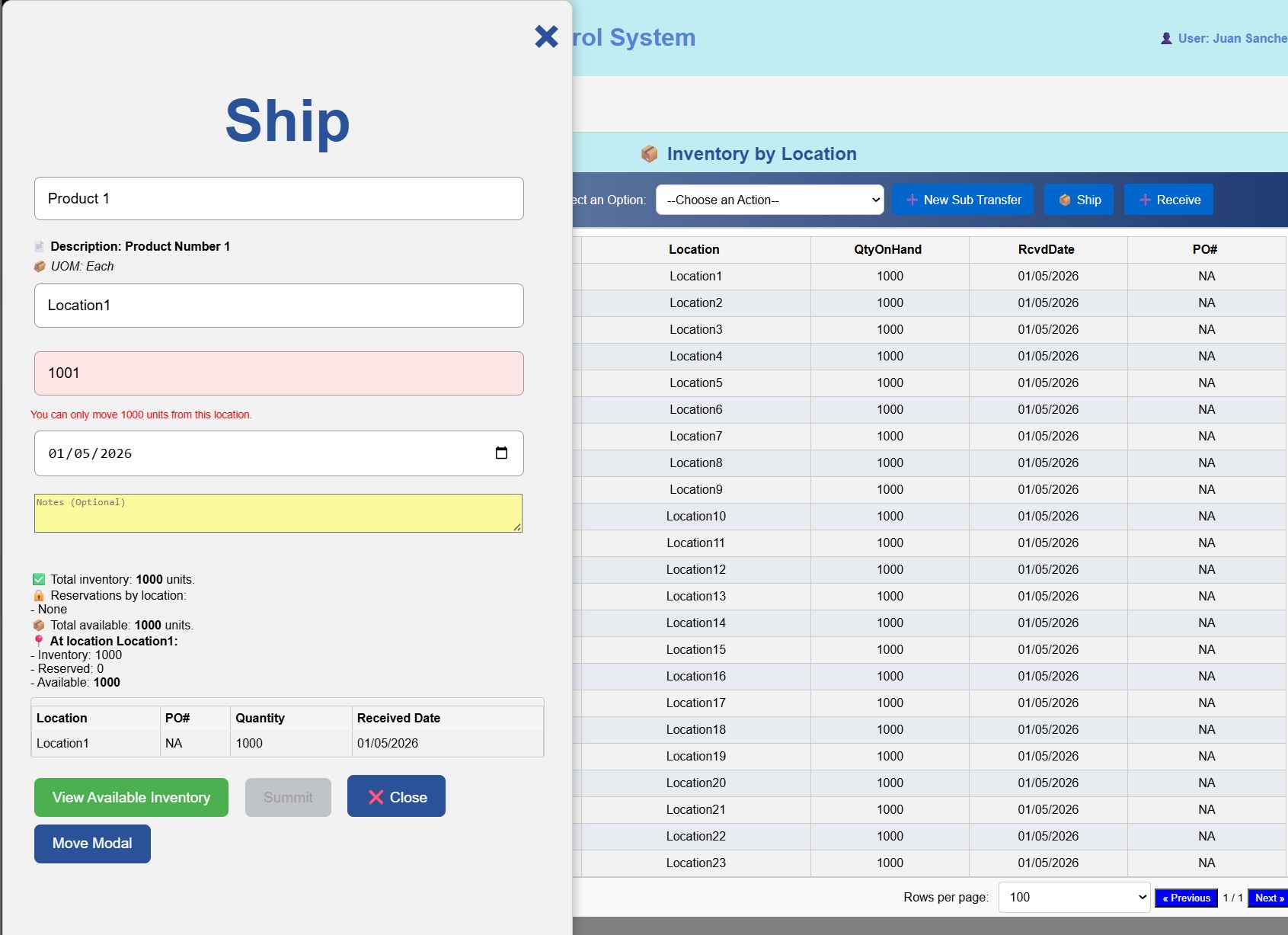
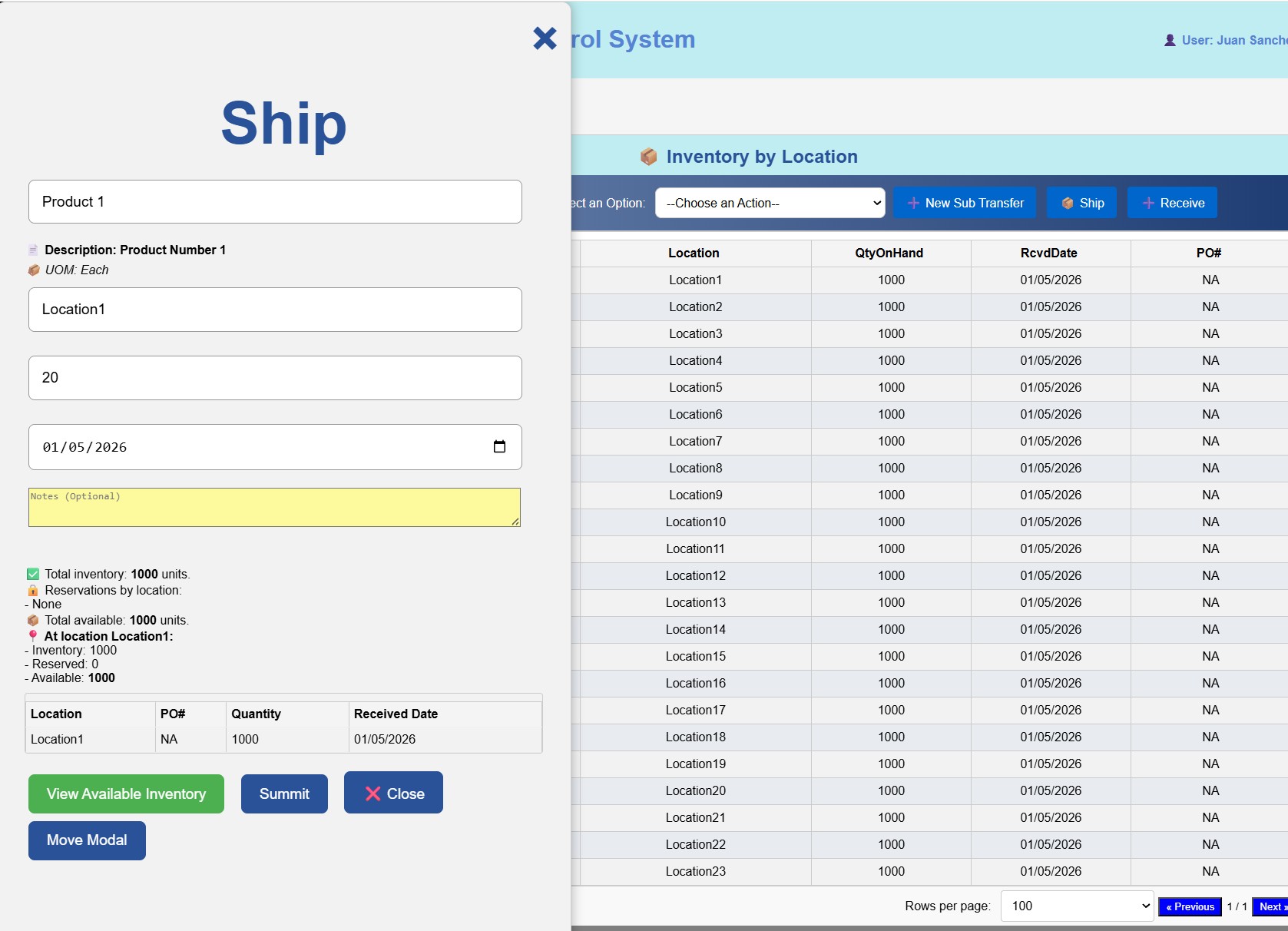
    Ship (Material Consumption / Picking)
    Remove inventory from a location in real time.
    The system logs:
    • What was taken
    • From which location
    • When
    • By which user
    All with strict validation to prevent incorrect part numbers or invalid locations.

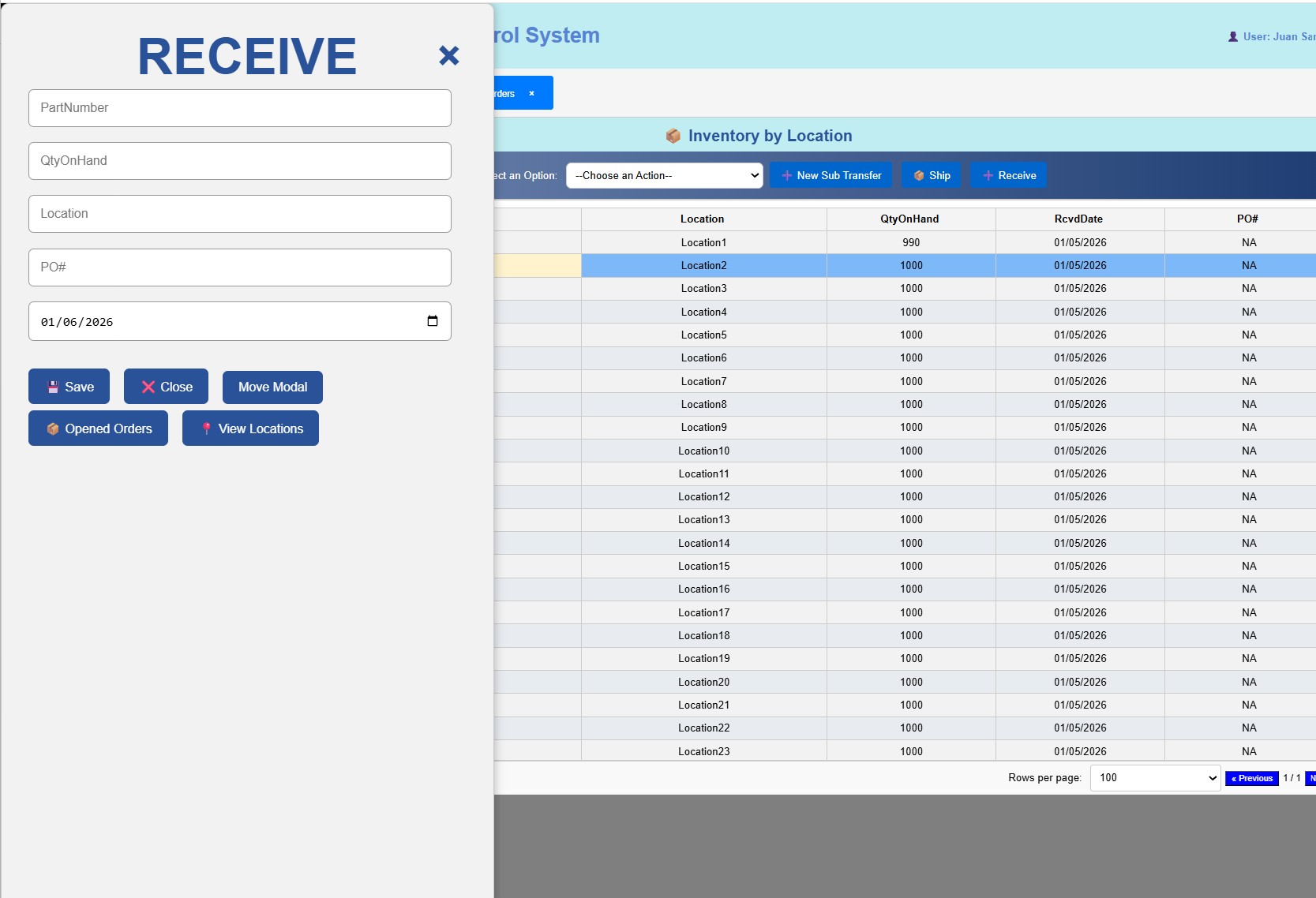
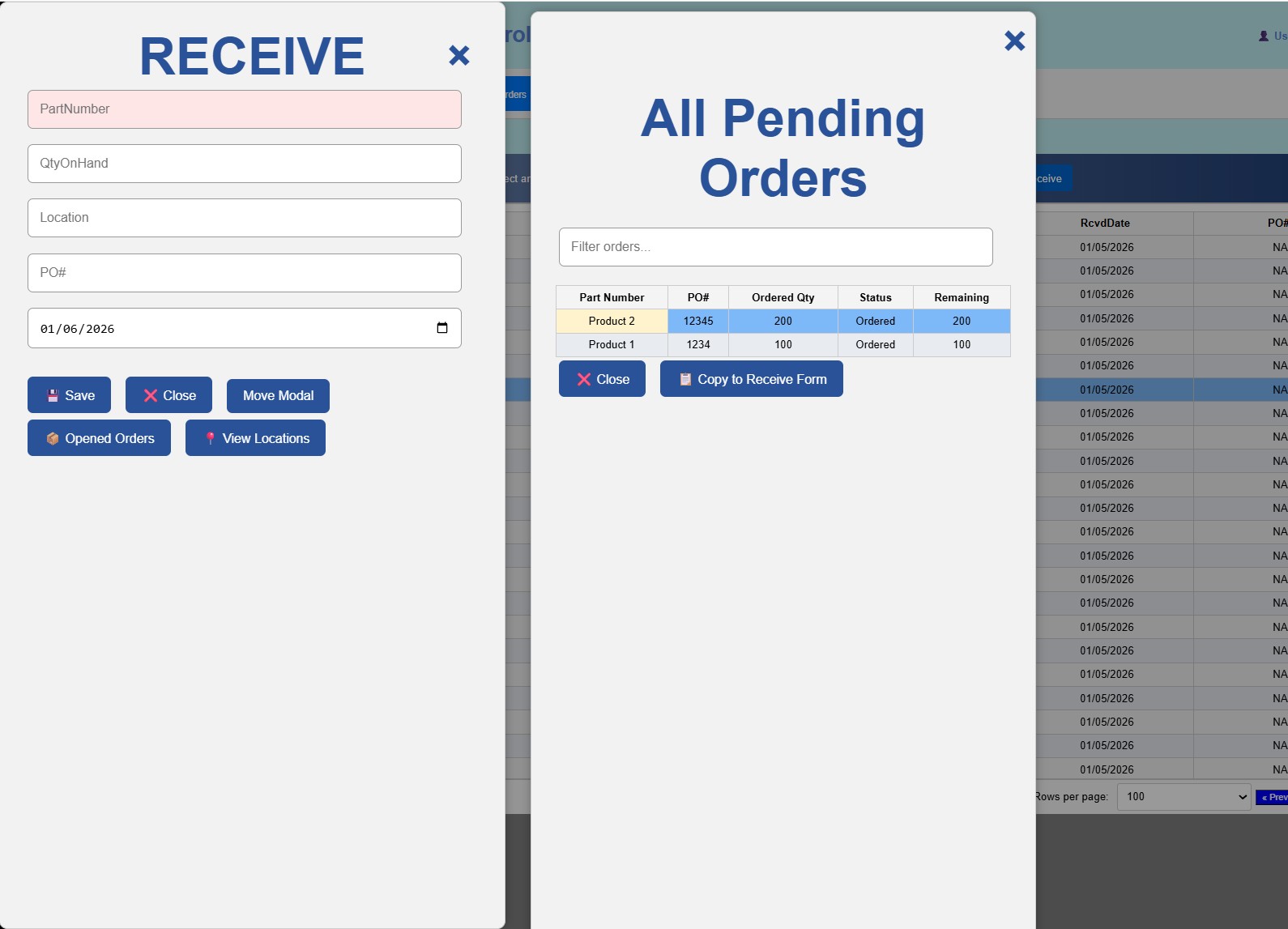
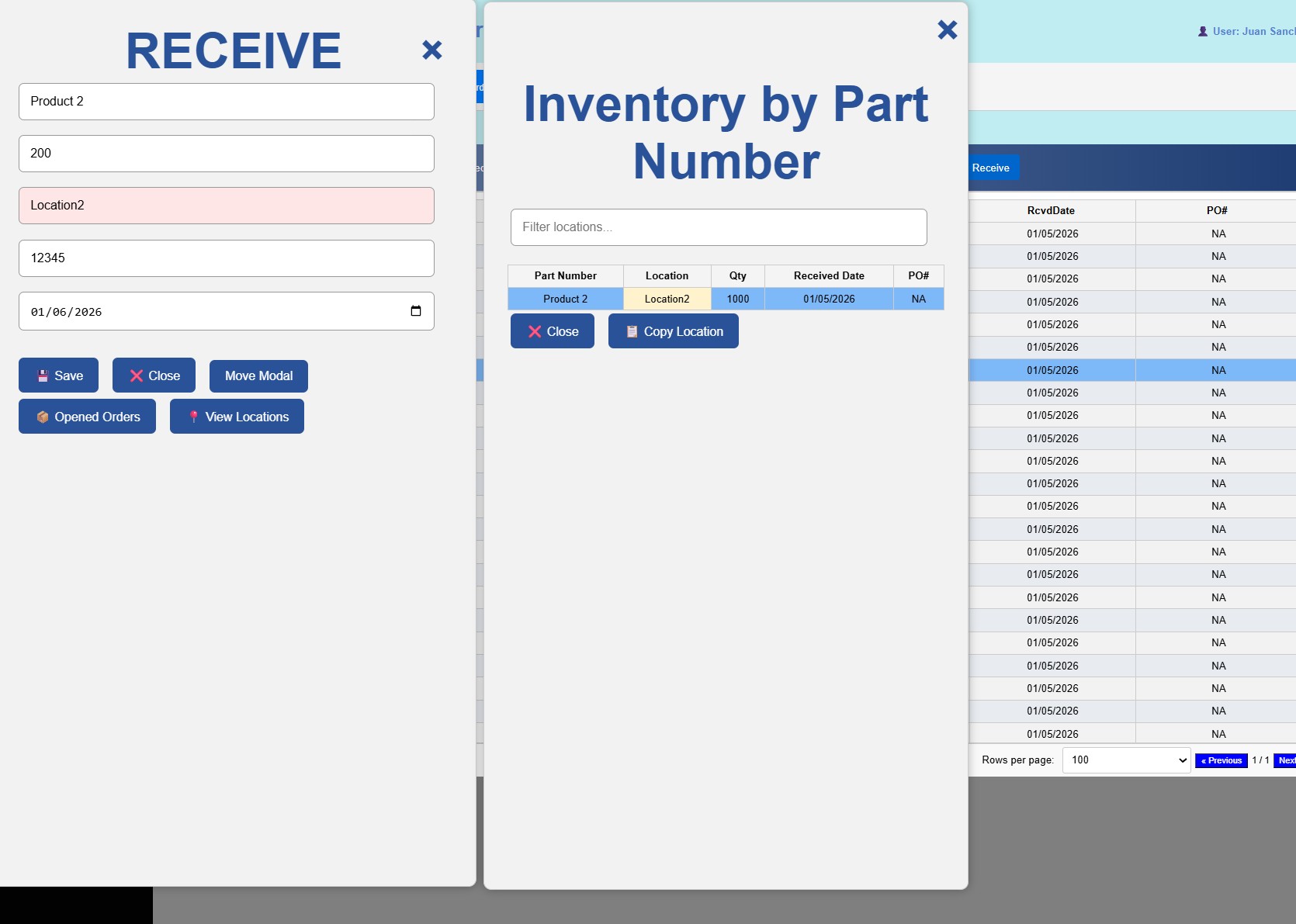
    Receive (Add Inventory)
    Add material into a location with real‑time updates and full validation.
    Ensures that only valid part numbers and valid locations are used.

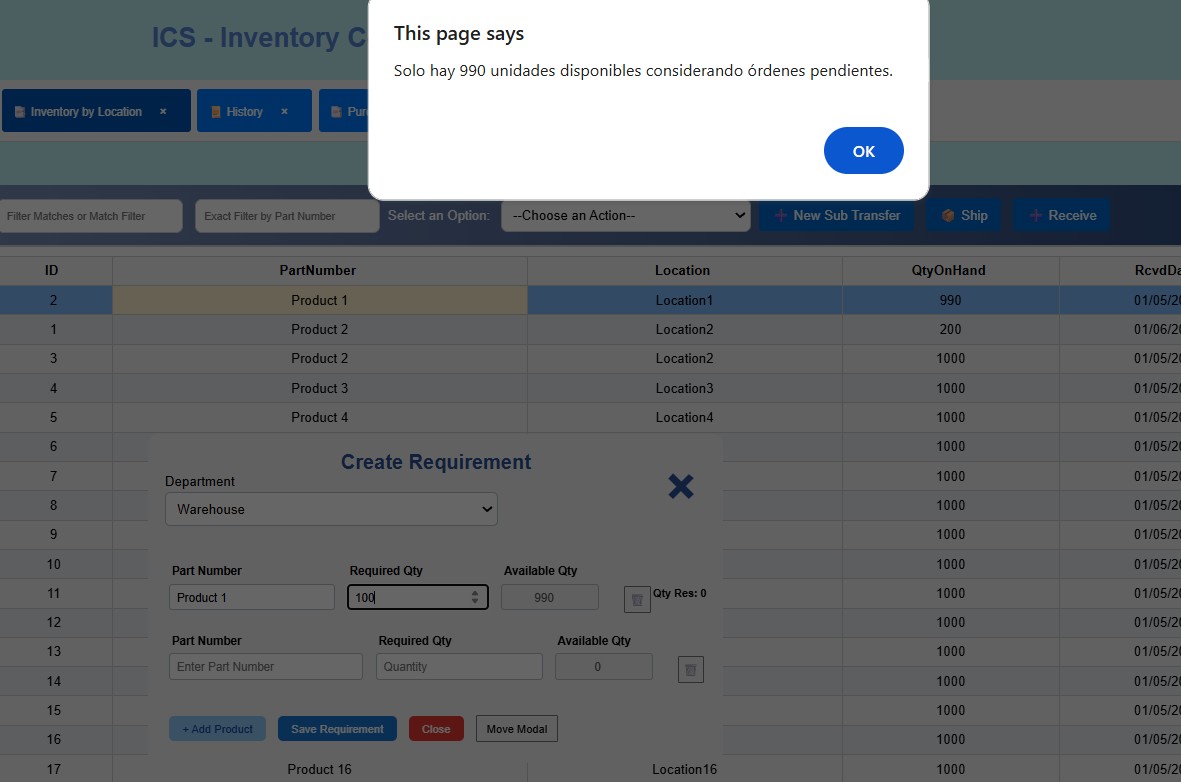
    Strict Validation Logic
    All operations in this module are protected by strong validation rules:
    • Prevents entering part numbers that do not exist in the system
    • Prevents using locations that are not registered
    • Ensures quantities are correct and consistent
    • Blocks invalid or incomplete transactions
    This guarantees data integrity and prevents operational mistakes.

    Real‑Time History Tracking
    Every action—ship, receive, sub‑transfer, bulk import, or physical count—automatically writes a detailed record into the system history, ensuring full traceability for audits and operational reviews.
  • ICS – Módulo de Inventario por Ubicación (Resumen)

    El módulo de Inventario por Ubicación proporciona una vista detallada y en tiempo real de la distribución del inventario en cada ubicación del almacén. Está diseñado para ofrecer precisión operativa, navegación rápida y procesamiento de transacciones de alto volumen, combinando la facilidad de uso tipo hoja de cálculo con validaciones estrictas de nivel WMS.

    Capacidades Principales

    Filtros Rápidos y Filtros Avanzados
    Los usuarios pueden reducir resultados al instante o aplicar filtros avanzados con múltiples criterios para analizar inventario por parte, ubicación, estatus u otros atributos.

    Interacción estilo Excel
    La tabla se comporta como una hoja de cálculo moderna:
    • Resaltado de fila completa al seleccionar
    • Resaltado de celda activa mostrando la celda exacta seleccionada
    • Efectos suaves de hover para escaneo rápido
    Esto hace que la interfaz sea extremadamente intuitiva para los operadores de almacén.

    Herramientas de Exportación
    El inventario puede exportarse a Excel o CSV para reportes, auditorías o análisis externos.

    Herramientas de Importación Masiva
    • Reemplazo total de inventario durante conteos físicos
    • Ajustes masivos de inventario sin entrada manual
    Estas herramientas reducen drásticamente el tiempo y eliminan errores humanos durante actualizaciones grandes.

    Funciones Operativas (Tiempo Real y Validadas)
    Este módulo no es solo una tabla — es un motor operativo. Incluye varias acciones de inventario en tiempo real:

    Sub‑Transferencia (Movimiento entre Ubicaciones)
    Mueve material de una ubicación a otra con ajustes automáticos tanto en origen como destino.
    Cada movimiento es validado y registrado en el historial del sistema.

    Ship (Consumo / Picking)
    Remueve inventario de una ubicación en tiempo real.
    El sistema registra:
    • Qué se tomó
    • De qué ubicación
    • Cuándo
    • Qué usuario lo realizó
    Todo con validaciones estrictas para evitar números de parte incorrectos o ubicaciones inválidas.

    Receive (Agregar Inventario)
    Agrega material a una ubicación con actualizaciones en tiempo real y validación completa.
    Garantiza que solo se usen números de parte y ubicaciones válidas.

    Lógica de Validación Estricta
    Todas las operaciones están protegidas por reglas de validación robustas:
    • Evita ingresar números de parte inexistentes
    • Evita usar ubicaciones no registradas
    • Asegura que las cantidades sean correctas y consistentes
    • Bloquea transacciones inválidas o incompletas
    Esto garantiza integridad de datos y previene errores operativos.

    Historial en Tiempo Real
    Cada acción — ship, receive, sub‑transfer, importación masiva o conteo físico — escribe automáticamente un registro detallado en el historial del sistema, asegurando trazabilidad completa para auditorías y revisiones operativas.
  • ICS – 按库位库存模块(摘要)

    按库位库存模块提供仓库中每个库位的库存分布的详细实时视图。该模块专为操作精确性、快速导航和高交易量处理而设计,将电子表格式的易用性与严格的 WMS 级验证相结合。

    主要功能

    快速筛选与高级筛选
    用户可以立即缩小结果范围,或应用多条件筛选以按物料、库位、状态或其他属性分析库存。

    类 Excel 交互方式
    表格表现如现代电子表格:
    • 选中时整行高亮
    • 活动单元格高亮显示精确点击的单元格
    • 平滑的悬停效果便于快速浏览
    这使界面对仓库操作员来说非常直观。

    导出工具
    库存可导出为 Excel 或 CSV,用于报告、审计或外部分析。

    批量导入工具
    • 盘点期间的库存全量替换
    • 无需手动输入的大规模库存调整
    这些工具大幅减少时间并消除大型更新中的人为错误。

    操作功能(实时且验证)
    该模块不仅是一张表格——它是一个操作引擎,包含多项实时库存操作:

    库位间转移(Sub‑Transfer)
    将物料从一个库位移动到另一个库位,并自动调整源库位和目标库位的数量。
    每次移动都会经过验证并记录在系统历史中。

    Ship(消耗 / 拣货)
    实时从库位移除库存。
    系统记录:
    • 移除的物料
    • 来源库位
    • 时间
    • 操作用户
    并通过严格验证防止错误物料编号或无效库位。

    Receive(新增库存)
    将物料添加到库位,并进行实时更新与完整验证。
    确保仅使用有效的物料编号和库位。

    严格的验证逻辑
    所有操作均受强验证规则保护:
    • 防止输入系统中不存在的物料编号
    • 防止使用未注册的库位
    • 确保数量正确且一致
    • 阻止无效或不完整的交易
    这确保数据完整性并防止操作错误。

    实时历史记录
    每个操作——ship、receive、sub‑transfer、批量导入或盘点——都会自动写入系统历史,确保审计和运营审查的完整可追溯性。
  • ICS – Item List & Location List Modules (Summary)

    The Item List and Location List modules form the core master‑data foundation of the ICS WMS. Every validation, every transaction, and every inventory movement depends on the accuracy and integrity of these two tables. Without them, the system cannot guarantee consistency, correctness, or traceability.

    Why These Tables Matter
    These modules define the official catalog of products and warehouse locations.
    They ensure that:
    • Only valid part numbers can be received, shipped, transferred, or adjusted
    • Only registered and active locations can be used in operations
    • All inventory activity is tied to clean, controlled master data
    • The system remains consistent and auditable across all modules

    They are the “source of truth” for the entire WMS.

    Item List – Key Capabilities
    The Item List stores all essential product attributes required for inventory control and reporting:

    • Part Number
    • Product Description
    • Unit of Measure (U/M)
    • Monthly Usage
    • Status (Active / Inactive)

    The status field is especially important:
    Inactive items remain in the system for historical reference, ensuring past transactions remain traceable while preventing new activity on discontinued parts.

    Functional Features
    • Quick Filters & Advanced Filters
    • Bulk Import of Items (avoid manual entry)
    • Export to Excel / CSV
    • Excel‑style row selection
    • Full‑row highlight
    • Active‑cell highlight
    • Hover interaction for fast scanning

    These features make the Item List fast, intuitive, and easy to maintain even with thousands of SKUs.

    Location List – Key Capabilities
    The Location List defines every valid storage location in the warehouse.
    Each location includes:

    • Location Code
    • Status (Active / Inactive)

    Inactive locations remain available for historical reference, ensuring past movements remain valid while preventing new transactions in obsolete areas.

    Functional Features
    • Quick Filters & Advanced Filters
    • Bulk Import of Locations
    • Export to Excel / CSV
    • Excel‑style interaction
    • Full‑row highlight
    • Active‑cell highlight
    • Hover effects for improved readability

    These tools make it easy to maintain a clean, accurate location structure — essential for all receiving, picking, transfers, and cycle counts.

    Why These Modules Are Critical
    Together, the Item List and Location List ensure:
    • Strict validation across all operational modules
    • Error‑free receiving, shipping, and transfers
    • Consistent inventory history
    • Accurate reporting and KPIs
    • A stable foundation for all real‑time transactions

    They are not just reference tables — they are the backbone of the entire ICS WMS.
  • ICS – Módulos de Lista de Artículos y Lista de Ubicaciones (Resumen)

    Los módulos de Lista de Artículos y Lista de Ubicaciones forman la base principal de datos maestros del WMS de ICS. Cada validación, cada transacción y cada movimiento de inventario depende de la precisión e integridad de estas dos tablas. Sin ellas, el sistema no puede garantizar consistencia, exactitud ni trazabilidad.

    Por qué estas tablas son importantes
    Estos módulos definen el catálogo oficial de productos y las ubicaciones del almacén.
    Garantizan que:
    • Solo números de parte válidos puedan recibirse, enviarse, transferirse o ajustarse
    • Solo ubicaciones registradas y activas puedan usarse en operaciones
    • Toda actividad de inventario esté vinculada a datos maestros limpios y controlados
    • El sistema se mantenga consistente y auditable en todos los módulos

    Son la “fuente de verdad” de todo el WMS.

    Lista de Artículos – Capacidades Clave
    La Lista de Artículos almacena todos los atributos esenciales requeridos para el control y reporte de inventario:

    • Número de Parte
    • Descripción del Producto
    • Unidad de Medida (U/M)
    • Uso Mensual
    • Estatus (Activo / Inactivo)

    El campo de estatus es especialmente importante:
    Los artículos inactivos permanecen en el sistema para referencia histórica, asegurando que transacciones pasadas sigan siendo trazables mientras se evita actividad nueva en partes descontinuadas.

    Funciones Principales
    • Filtros Rápidos y Filtros Avanzados
    • Importación Masiva de Artículos (evita entrada manual)
    • Exportación a Excel / CSV
    • Selección estilo Excel
    • Resaltado de fila completa
    • Resaltado de celda activa
    • Interacción hover para escaneo rápido

    Estas funciones hacen que la Lista de Artículos sea rápida, intuitiva y fácil de mantener incluso con miles de SKUs.

    Lista de Ubicaciones – Capacidades Clave
    La Lista de Ubicaciones define cada ubicación válida del almacén.
    Cada ubicación incluye:

    • Código de Ubicación
    • Estatus (Activo / Inactivo)

    Las ubicaciones inactivas permanecen disponibles para referencia histórica, asegurando que movimientos pasados sigan siendo válidos mientras se evita actividad nueva en áreas obsoletas.

    Funciones Principales
    • Filtros Rápidos y Filtros Avanzados
    • Importación Masiva de Ubicaciones
    • Exportación a Excel / CSV
    • Interacción estilo Excel
    • Resaltado de fila completa
    • Resaltado de celda activa
    • Efectos hover para mejorar la legibilidad

    Estas herramientas facilitan mantener una estructura de ubicaciones limpia y precisa — esencial para recepción, picking, transferencias y conteos cíclicos.

    Por qué estos módulos son críticos
    Juntos, la Lista de Artículos y la Lista de Ubicaciones garantizan:
    • Validación estricta en todos los módulos operativos
    • Recepción, envíos y transferencias sin errores
    • Historial de inventario consistente
    • Reportes y KPIs precisos
    • Una base estable para todas las transacciones en tiempo real

    No son solo tablas de referencia — son la columna vertebral de todo el WMS de ICS.
  • ICS – 物料清单与库位清单模块(摘要)

    物料清单和库位清单模块构成 ICS WMS 的核心主数据基础。每一次验证、每一笔交易、每一次库存移动都依赖于这两张表的准确性和完整性。没有它们,系统无法保证一致性、正确性或可追溯性。

    这些表为何重要
    这些模块定义了仓库的官方产品目录和库位结构。
    它们确保:
    • 只有有效的物料编号才能被接收、发货、转移或调整
    • 只有已注册且处于激活状态的库位才能用于操作
    • 所有库存活动都与干净、受控的主数据关联
    • 系统在所有模块中保持一致且可审计

    它们是整个 WMS 的“真实来源”。

    物料清单 – 关键功能
    物料清单存储库存控制和报告所需的所有关键产品属性:

    • 物料编号
    • 产品描述
    • 计量单位 (U/M)
    • 月使用量
    • 状态(激活 / 未激活)

    状态字段尤为重要:
    未激活的物料仍保留在系统中用于历史参考,确保过去的交易可追溯,同时防止对已停用物料进行新的操作。

    功能特性
    • 快速筛选与高级筛选
    • 批量导入物料(避免手动输入)
    • 导出至 Excel / CSV
    • 类 Excel 行选择
    • 整行高亮
    • 活动单元格高亮
    • 悬停交互以便快速浏览

    这些功能使物料清单即使在拥有数千个 SKU 时仍然快速、直观且易于维护。

    库位清单 – 关键功能
    库位清单定义仓库中的每一个有效库位。
    每个库位包含:

    • 库位代码
    • 状态(激活 / 未激活)

    未激活的库位仍保留用于历史参考,确保过去的移动记录有效,同时防止在过时区域进行新的操作。

    功能特性
    • 快速筛选与高级筛选
    • 批量导入库位
    • 导出至 Excel / CSV
    • 类 Excel 交互方式
    • 整行高亮
    • 活动单元格高亮
    • 悬停效果以提升可读性

    这些工具使维护干净、准确的库位结构变得容易——这是所有收货、拣货、转移和盘点操作的基础。

    这些模块为何至关重要
    物料清单与库位清单共同确保:
    • 所有操作模块中的严格验证
    • 无错误的收货、发货和转移
    • 一致的库存历史
    • 准确的报告与 KPI
    • 所有实时交易的稳定基础

    它们不仅是参考表 —— 它们是整个 ICS WMS 的支柱。
  • ICS – Purchase Orders Module (Summary)

    The Purchase Orders module provides a complete, structured, and highly interactive way to manage inbound orders. It combines spreadsheet‑like usability with strict validation logic and real‑time receiving controls, ensuring that every PO is processed accurately and consistently.

    Key Capabilities

    Quick Filters & Advanced Filters
    Users can instantly narrow down POs or apply multi‑criteria filtering to analyze orders by part number, supplier, status, or date.

    Bulk Import & Template Generation
    • Import all Purchase Orders at once
    • Generate a standardized template to ensure consistent formatting
    Prevents manual entry errors and accelerates onboarding of large PO batches.

    Manual PO Entry
    Users can also create POs one by one by entering:
    • Part Number
    • PO Number
    • Ordered Quantity
    • Supplier
    • Ordered Date (auto‑generated)
    This flexibility supports both automated and manual workflows.

    Excel‑Style Interaction
    Just like the other ICS tables, the Purchase Orders module includes:
    • Full‑row highlight when a row is selected
    • Active‑cell highlight showing the exact clicked cell
    • Hover effects for fast scanning and improved readability
    This makes the table feel familiar and intuitive, especially for users accustomed to Excel.

    PO Status Logic (Real‑Time & Color‑Coded)
    One of the most elegant features of this module is its dynamic status system, which updates automatically based on receiving activity:

    Ordered
    • Default state when the PO is created
    • Displayed with its own color for quick identification

    Partial
    • Triggered when the received quantity is less than the ordered quantity
    • Helps operators instantly identify incomplete receipts

    Allocated / Completed
    • Triggered when the full quantity has been received
    • Highlighted in green to indicate completion

    Strict Receiving Validation
    The system enforces strong validation rules to maintain data integrity:
    • Prevents receiving more than the ordered quantity
    • If a user attempts to receive again, the system only allows the remaining quantity
    • Blocks invalid part numbers
    • Blocks invalid or inactive suppliers
    • Ensures all receiving activity is consistent with the PO
    This prevents over‑receiving, duplicate receipts, and incorrect data entry.

    Data Fields Included
    The Purchase Orders table displays all essential inbound order information:

    • Part Number
    • PO Number
    • Ordered Quantity
    • Ordered Date
    • Ordered By
    • Supplier
    • Status
    • Received Date
    • Received By
    • Received Quantity

    Real‑Time Updates & History Tracking
    Every receiving action updates the PO in real time and writes a detailed record to the system history, ensuring full traceability for audits and operational reviews.
  • ICS – Módulo de Órdenes de Compra (Resumen)

    El módulo de Órdenes de Compra proporciona una forma completa, estructurada y altamente interactiva de gestionar órdenes entrantes. Combina la facilidad de uso tipo hoja de cálculo con lógica de validación estricta y controles de recepción en tiempo real, garantizando que cada OC sea procesada de manera precisa y consistente.

    Capacidades Principales

    Filtros Rápidos y Filtros Avanzados
    Los usuarios pueden reducir instantáneamente las OCs o aplicar filtros avanzados con múltiples criterios para analizarlas por número de parte, proveedor, estatus o fecha.

    Importación Masiva y Generación de Plantillas
    • Importar todas las Órdenes de Compra de una sola vez
    • Generar una plantilla estandarizada para asegurar formato consistente
    Evita errores de captura manual y acelera la carga de grandes lotes de OCs.

    Entrada Manual de OCs
    Los usuarios también pueden crear OCs una por una ingresando:
    • Número de Parte
    • Número de OC
    • Cantidad Ordenada
    • Proveedor
    • Fecha de Orden (generada automáticamente)
    Esta flexibilidad soporta flujos de trabajo automáticos y manuales.

    Interacción estilo Excel
    Igual que las demás tablas de ICS, el módulo incluye:
    • Resaltado de fila completa al seleccionar
    • Resaltado de celda activa
    • Efectos hover para escaneo rápido y mejor legibilidad
    Hace que la tabla sea intuitiva, especialmente para usuarios acostumbrados a Excel.

    Lógica de Estatus de OC (Tiempo Real y con Colores)
    Una de las funciones más elegantes del módulo es su sistema dinámico de estatus, que se actualiza automáticamente según la actividad de recepción:

    Ordered
    • Estado por defecto al crear la OC
    • Se muestra con su propio color para identificación rápida

    Partial
    • Se activa cuando la cantidad recibida es menor a la ordenada
    • Ayuda a identificar recibos incompletos al instante

    Allocated / Completed
    • Se activa cuando se recibe la cantidad total
    • Se resalta en verde para indicar finalización

    Validación Estricta de Recepciones
    El sistema aplica reglas fuertes de validación para mantener integridad de datos:
    • Evita recibir más de lo ordenado
    • Si se intenta recibir nuevamente, solo permite la cantidad restante
    • Bloquea números de parte inválidos
    • Bloquea proveedores inválidos o inactivos
    • Asegura que toda recepción sea consistente con la OC
    Previene sobre‑recepciones, duplicados y errores de captura.

    Campos Incluidos
    La tabla de Órdenes de Compra muestra toda la información esencial:

    • Número de Parte
    • Número de OC
    • Cantidad Ordenada
    • Fecha de Orden
    • Ordenado Por
    • Proveedor
    • Estatus
    • Fecha de Recepción
    • Recibido Por
    • Cantidad Recibida

    Actualizaciones en Tiempo Real y Registro Histórico
    Cada acción de recepción actualiza la OC en tiempo real y escribe un registro detallado en el historial del sistema, asegurando trazabilidad completa para auditorías y revisiones operativas.
  • ICS – 采购订单模块(摘要)

    采购订单模块提供一种完整、结构化且高度互动的方式来管理入库订单。它结合了电子表格式的易用性、严格的验证逻辑以及实时收货控制,确保每一张采购订单都能被准确且一致地处理。

    主要功能

    快速筛选与高级筛选
    用户可以立即缩小采购订单范围,或使用多条件筛选按物料编号、供应商、状态或日期进行分析。

    批量导入与模板生成
    • 一次性导入所有采购订单
    • 生成标准化模板以确保一致的格式
    避免手动输入错误,加速大量采购订单的导入流程。

    手动录入采购订单
    用户也可以逐条创建采购订单,输入:
    • 物料编号
    • 采购订单号
    • 订购数量
    • 供应商
    • 订购日期(自动生成)
    这种灵活性支持自动化与手动流程。

    类 Excel 交互方式
    与 ICS 的其他表格一样,该模块包括:
    • 选中时整行高亮
    • 活动单元格高亮显示点击的确切位置
    • 悬停效果便于快速浏览与提高可读性
    让界面对熟悉 Excel 的用户来说非常直观。

    采购订单状态逻辑(实时且颜色标识)
    该模块最优雅的功能之一是其动态状态系统,会根据收货活动自动更新:

    Ordered(已下单)
    • 创建采购订单时的默认状态
    • 使用独特颜色显示以便快速识别

    Partial(部分收货)
    • 当收货数量小于订购数量时触发
    • 帮助操作员快速识别未完成的收货

    Allocated / Completed(已完成)
    • 当全部数量收货完成时触发
    • 使用绿色高亮以表示完成

    严格的收货验证
    系统通过强验证规则确保数据完整性:
    • 防止收货数量超过订购数量
    • 若再次收货,仅允许剩余数量
    • 阻止无效物料编号
    • 阻止无效或未激活的供应商
    • 确保所有收货活动与采购订单一致
    防止超收、重复收货和错误录入。

    包含的数据字段
    采购订单表显示所有关键入库信息:

    • 物料编号
    • 采购订单号
    • 订购数量
    • 订购日期
    • 下单人
    • 供应商
    • 状态
    • 收货日期
    • 收货人
    • 收货数量

    实时更新与历史记录
    每一次收货都会实时更新采购订单,并写入系统历史记录,确保审计与运营审查的完整可追溯性。
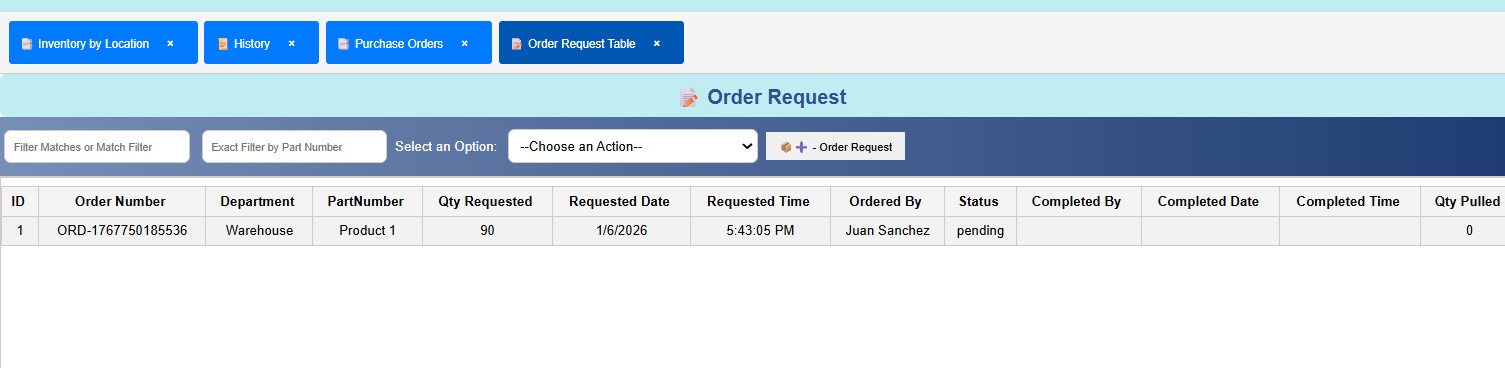
  • ICS – Order Request Module (Summary)

    The Order Request module manages internal material requests submitted by different departments within the operation. It provides a structured, traceable, and highly interactive workflow for creating, reviewing, fulfilling, and auditing internal orders. Like the other ICS tables, it combines spreadsheet‑style usability with strict validation and real‑time updates.

    Key Capabilities

    Quick Filters & Advanced Filters
    Users can instantly filter by order number, department, part number, status, date, or any other field.
    Advanced filters allow multi‑criteria searches for deeper operational analysis.

    Export & History Management
    • Export all order requests to Excel or CSV
    • Clear historical records when needed (with controlled access)
    Maintain clean, organized data for audits and reporting.

    Modal‑Based Order Creation
    A clean, guided modal allows users to create new internal orders by entering:
    • Part Number
    • Department
    • Required Quantity
    • Required Date & Time
    • Ordered By
    This ensures consistency and reduces data entry errors.

    Excel‑Style Interaction
    Just like the other ICS tables, the Order Request module includes:
    • Full‑row highlight when a row is selected
    • Active‑cell highlight showing the exact clicked cell
    • Hover effects for fast scanning and improved readability
    This makes the table intuitive and efficient for daily use.

    Data Fields Included
    The module displays all relevant information for tracking and fulfilling internal orders:

    • Order Number
    • Department
    • Part Number
    • Requested Quantity
    • Requested Date
    • Requested Time
    • Ordered By
    • Status
    • Completed By
    • Completed Date
    • Completed Time
    • Actual Quantity Pulled

    Status Logic & Workflow Tracking
    The system automatically updates the order status based on operational activity:

    Ordered – when the request is first created
    In Progress – when the order is being fulfilled
    Completed – when the requested quantity has been pulled
    Partially Completed – when only part of the quantity was fulfilled

    Each status is color‑coded for fast visual recognition, making it easy for operators and supervisors to understand the state of every request at a glance.

    Strict Validation & Real‑Time Updates
    The module enforces strong validation rules to maintain data integrity:
    • Prevents entering invalid part numbers
    • Prevents using inactive or invalid departments
    • Ensures quantities and dates are correct
    • Updates the table in real time as orders are fulfilled
    • Writes every action to the system history for full traceability

    This ensures that every internal order is accurate, auditable, and consistent with the rest of the WMS.
  • ICS – Módulo de Solicitudes de Orden (Resumen)

    El módulo de Solicitudes de Orden gestiona las solicitudes internas de material enviadas por diferentes departamentos dentro de la operación. Proporciona un flujo de trabajo estructurado, trazable y altamente interactivo para crear, revisar, completar y auditar solicitudes internas. Al igual que las demás tablas de ICS, combina facilidad de uso tipo hoja de cálculo con validación estricta y actualizaciones en tiempo real.

    Capacidades Principales

    Filtros Rápidos y Filtros Avanzados
    Los usuarios pueden filtrar instantáneamente por número de orden, departamento, número de parte, estatus, fecha o cualquier otro campo.
    Los filtros avanzados permiten búsquedas con múltiples criterios para análisis operativos más profundos.

    Exportación y Gestión de Historial
    • Exportar todas las solicitudes a Excel o CSV
    • Limpiar el historial cuando sea necesario (con acceso controlado)
    Mantiene datos limpios y organizados para auditorías y reportes.

    Creación de Solicitudes mediante Modal
    Un modal limpio y guiado permite crear nuevas solicitudes internas ingresando:
    • Número de Parte
    • Departamento
    • Cantidad Requerida
    • Fecha y Hora Requerida
    • Solicitado Por
    Esto asegura consistencia y reduce errores de captura.

    Interacción estilo Excel
    Igual que las demás tablas ICS, el módulo incluye:
    • Resaltado de fila completa al seleccionar
    • Resaltado de celda activa
    • Efectos hover para escaneo rápido y mejor legibilidad
    Hace la tabla intuitiva y eficiente para el uso diario.

    Campos Incluidos
    El módulo muestra toda la información relevante para rastrear y completar solicitudes internas:

    • Número de Orden
    • Departamento
    • Número de Parte
    • Cantidad Solicitada
    • Fecha Solicitada
    • Hora Solicitada
    • Solicitado Por
    • Estatus
    • Completado Por
    • Fecha de Completado
    • Hora de Completado
    • Cantidad Real Extraída

    Lógica de Estatus y Seguimiento del Flujo
    El sistema actualiza automáticamente el estatus de la solicitud según la actividad operativa:

    Ordered – cuando la solicitud es creada
    In Progress – cuando la solicitud está siendo atendida
    Completed – cuando la cantidad solicitada ha sido extraída
    Partially Completed – cuando solo parte de la cantidad fue extraída

    Cada estatus tiene un color asignado para reconocimiento visual rápido, facilitando que operadores y supervisores entiendan el estado de cada solicitud de un vistazo.

    Validación Estricta y Actualizaciones en Tiempo Real
    El módulo aplica reglas estrictas de validación para mantener integridad de datos:
    • Evita ingresar números de parte inválidos
    • Evita usar departamentos inactivos o inválidos
    • Asegura que cantidades y fechas sean correctas
    • Actualiza la tabla en tiempo real conforme se completan solicitudes
    • Registra cada acción en el historial del sistema para trazabilidad completa

    Esto garantiza que cada solicitud interna sea precisa, auditable y consistente con el resto del WMS.
  • ICS – 内部申请单模块(摘要)

    内部申请单模块用于管理由不同部门提交的物料申请。它提供结构化、可追踪且高度互动的工作流程,用于创建、审核、完成和审计内部订单。与其他 ICS 表格一样,它结合了电子表格式的易用性、严格的验证逻辑以及实时更新能力。

    主要功能

    快速筛选与高级筛选
    用户可以按订单号、部门、物料编号、状态、日期等字段即时筛选。
    高级筛选允许多条件组合查询,以进行更深入的运营分析。

    导出与历史记录管理
    • 将所有申请单导出为 Excel 或 CSV
    • 在需要时清理历史记录(受控权限)
    保持数据整洁、有序,便于审计与报告。

    基于 Modal 的申请创建
    一个简洁的引导式 modal 允许用户创建新的内部申请,输入:
    • 物料编号
    • 部门
    • 需求数量
    • 需求日期与时间
    • 申请人
    确保一致性并减少输入错误。

    类 Excel 交互方式
    与 ICS 其他表格一致,本模块包括:
    • 选中时整行高亮
    • 活动单元格高亮显示点击的确切位置
    • 悬停效果便于快速浏览与提高可读性
    使界面直观且高效,适合日常使用。

    包含的数据字段
    模块显示所有用于跟踪和完成内部申请的相关信息:

    • 订单号
    • 部门
    • 物料编号
    • 需求数量
    • 需求日期
    • 需求时间
    • 申请人
    • 状态
    • 完成者
    • 完成日期
    • 完成时间
    • 实际提取数量

    状态逻辑与流程跟踪
    系统会根据操作活动自动更新申请状态:

    Ordered – 创建申请时
    In Progress – 申请正在处理时
    Completed – 所需数量全部提取时
    Partially Completed – 仅部分数量被提取时

    每个状态都有颜色标识,便于操作员和主管快速识别申请进度。

    严格验证与实时更新
    模块通过强验证规则确保数据完整性:
    • 防止输入无效物料编号
    • 防止使用无效或未激活的部门
    • 确保数量与日期正确
    • 在申请完成时实时更新表格
    • 所有操作都会写入系统历史记录,确保完整可追溯性

    这确保每一张内部申请都准确、可审计,并与整个 WMS 保持一致。
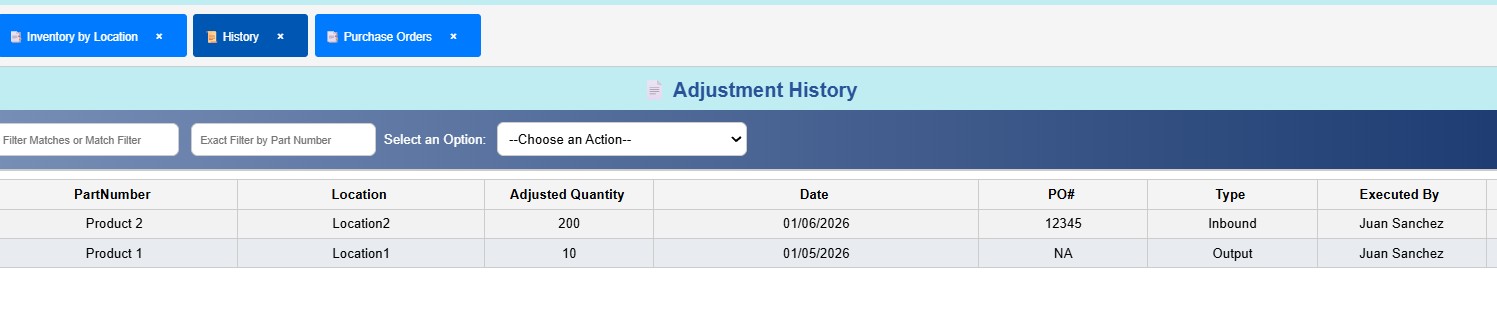
  • ICS – Inventory History Module (Summary)

    The Inventory History module is the central audit trail of the ICS WMS. Every movement, adjustment, transaction, and operational action flows into this table. It provides complete visibility into why inventory increased, decreased, moved, or changed status — making it the most critical module for audits, investigations, and operational accuracy.

    Purpose & Importance
    This module records every single event that affects inventory, including:
    • Additions (receiving, put‑away, inbound)
    • Subtractions (shipping, picking, consumption)
    • Transfers between locations
    • Manual adjustments
    • Order Requests
    • Bulk imports
    • Physical counts
    • Any system‑generated correction

    Because it captures the full lifecycle of inventory activity, it allows supervisors, auditors, and managers to answer essential questions:
    • Why did inventory go down?
    • Why did inventory go up?
    • Who performed the action?
    • When did it happen?
    • Where was the material moved from and to?
    • What type of transaction caused the change?

    This module is the foundation of traceability, accountability, and operational transparency.

    Data Fields Included
    The History table stores all relevant details for every transaction:

    • Part Number
    • Location(s) involved
    • Quantity Change (positive or negative)
    • Timestamp (exact date and time of the event)
    • Period (if applicable to the inventory cycle)
    • Transaction Type:
      – Put Away
      – Inbound
      – Manual Adjustment
      – Order Request
      – Sub‑Transfer
      – Ship
      – Receive
      – And more
    • Executed By (the user who performed the action)
    • Notes
    • Order Request number
    • Put‑away PIN
    • Additional context or references

    This level of detail ensures that every movement is fully documented and easy to trace.

    Functional Features
    Just like the other ICS tables, the History module includes:

    Quick Filters & Advanced Filters
    Instantly narrow down thousands of records by part number, type, user, date, or any other field.

    Excel‑Style Interaction
    • Full‑row highlight
    • Active‑cell highlight
    • Smooth hover effects

    Export Tools
    Export the entire history or filtered results to Excel or CSV for audits, reporting, or external analysis.

    These features make it easy to navigate large volumes of historical data with speed and precision.

    Why This Module Is Critical
    The History module is the single source of truth for:
    • Audits
    • Investigations
    • Inventory discrepancies
    • Cycle counts
    • Supervisor reviews
    • Compliance
    • Root‑cause analysis

    It ensures that ICS is not just a real‑time WMS, but a fully traceable and accountable system where every action is recorded, validated, and preserved.
  • ICS – Módulo de Historial de Inventario (Resumen)

    El módulo de Historial de Inventario es la pista de auditoría central del WMS de ICS. Cada movimiento, ajuste, transacción y acción operativa fluye hacia esta tabla. Proporciona visibilidad completa sobre por qué el inventario aumentó, disminuyó, se movió o cambió de estatus — convirtiéndolo en el módulo más crítico para auditorías, investigaciones y precisión operativa.

    Propósito e Importancia
    Este módulo registra cada evento que afecta el inventario, incluyendo:
    • Adiciones (recepción, put‑away, inbound)
    • Sustracciones (shipping, picking, consumo)
    • Transferencias entre ubicaciones
    • Ajustes manuales
    • Solicitudes de Orden
    • Importaciones masivas
    • Conteos físicos
    • Cualquier corrección generada por el sistema

    Debido a que captura el ciclo completo de actividad del inventario, permite a supervisores, auditores y gerentes responder preguntas esenciales:
    • ¿Por qué bajó el inventario?
    • ¿Por qué subió el inventario?
    • ¿Quién realizó la acción?
    • ¿Cuándo ocurrió?
    • ¿De dónde y hacia dónde se movió el material?
    • ¿Qué tipo de transacción causó el cambio?

    Este módulo es la base de la trazabilidad, responsabilidad y transparencia operativa.

    Campos Incluidos
    La tabla de Historial almacena todos los detalles relevantes de cada transacción:

    • Número de Parte
    • Ubicación(es) involucradas
    • Cambio de Cantidad (positivo o negativo)
    • Marca de Tiempo (fecha y hora exacta del evento)
    • Periodo (si aplica al ciclo de inventario)
    • Tipo de Transacción:
      – Put Away
      – Inbound
      – Ajuste Manual
      – Solicitud de Orden
      – Sub‑Transferencia
      – Ship
      – Receive
      – Y más
    • Ejecutado Por (usuario que realizó la acción)
    • Notas
    • Número de Solicitud de Orden
    • PIN de Put‑away
    • Contexto o referencias adicionales

    Este nivel de detalle garantiza que cada movimiento esté completamente documentado y sea fácil de rastrear.

    Funciones Principales

    Filtros Rápidos y Filtros Avanzados
    Permiten reducir miles de registros al instante por número de parte, tipo, usuario, fecha u otros campos.

    Interacción estilo Excel
    • Resaltado de fila completa
    • Resaltado de celda activa
    • Efectos hover suaves

    Herramientas de Exportación
    Exporta el historial completo o resultados filtrados a Excel o CSV para auditorías, reportes o análisis externos.

    Estas funciones facilitan navegar grandes volúmenes de datos históricos con rapidez y precisión.

    Por qué este módulo es crítico
    El módulo de Historial es la única fuente de verdad para:
    • Auditorías
    • Investigaciones
    • Diferencias de inventario
    • Conteos cíclicos
    • Revisiones de supervisión
    • Cumplimiento
    • Análisis de causa raíz

    Asegura que ICS no sea solo un WMS en tiempo real, sino un sistema completamente trazable y responsable donde cada acción queda registrada, validada y preservada.
  • ICS – 库存历史模块(摘要)

    库存历史模块是 ICS WMS 的核心审计轨迹。每一次移动、调整、交易和操作行为都会流入此表。它提供对库存增加、减少、移动或状态变化原因的完整可视化,是审计、调查和运营准确性中最关键的模块。

    目的与重要性
    该模块记录所有影响库存的事件,包括:
    • 增加(收货、上架、入库)
    • 减少(发货、拣货、消耗)
    • 库位之间的转移
    • 手动调整
    • 内部申请单
    • 批量导入
    • 盘点
    • 系统自动修正

    因为它捕捉了库存活动的完整生命周期,使主管、审计员和管理者能够回答关键问题:
    • 库存为何减少?
    • 库存为何增加?
    • 谁执行了该操作?
    • 何时发生?
    • 从哪里移动到哪里?
    • 是哪种交易类型导致的变化?

    该模块是可追溯性、责任机制和运营透明度的基础。

    包含的数据字段
    历史记录表存储每笔交易的所有相关细节:

    • 物料编号
    • 涉及的库位
    • 数量变化(正或负)
    • 时间戳(事件的精确日期和时间)
    • 周期(若适用于库存周期)
    • 交易类型:
      – 上架(Put Away)
      – 入库(Inbound)
      – 手动调整
      – 内部申请单
      – 库位转移(Sub‑Transfer)
      – 发货(Ship)
      – 收货(Receive)
      – 以及更多
    • 执行人(操作用户)
    • 备注
    • 申请单编号
    • 上架 PIN
    • 其他上下文或参考信息

    这种细节级别确保每一次移动都被完整记录并易于追踪。

    功能特性

    快速筛选与高级筛选
    可按物料编号、类型、用户、日期等字段即时筛选数千条记录。

    类 Excel 交互方式
    • 整行高亮
    • 活动单元格高亮
    • 平滑悬停效果

    导出工具
    可将全部历史记录或筛选结果导出为 Excel 或 CSV,用于审计、报告或外部分析。

    这些功能使浏览大量历史数据变得快速且精准。

    为何此模块至关重要
    历史模块是以下工作的唯一真实来源:
    • 审计
    • 调查
    • 库存差异分析
    • 循环盘点
    • 主管审查
    • 合规性检查
    • 根因分析

    它确保 ICS 不仅是一个实时 WMS,更是一个完全可追溯、可审计的系统,每个动作都被记录、验证并永久保存。
  • ICS – Picking Orders / Replacement Modal (Summary)

    The Picking Orders / Replacement modal is the operational interface used to fulfill internal material requests generated by the Order Request module. It is designed to ensure accuracy, enforce FIFO logic, prevent conflicts between users, and maintain full traceability of every picking action.

    Automatic Order Assignment
    When a user opens the modal:
    • The system automatically assigns the oldest pending order to that user.
    • The order becomes locked, preventing other users from taking it at the same time.

    This ensures fairness, prevents duplication, and maintains a clean workflow.

    Real‑Time Picking Interface
    The modal displays all essential information for fulfilling the order:
    • Product Name / Part Number
    • Requested Quantity
    • Input field for Actual Quantity Pulled
    • Primary Location (FIFO‑based)

    The system automatically selects the oldest available location (FIFO) as the default pick location.

    Flexible Location Selection
    Although the system recommends the primary FIFO location, the user is not forced to pick from it. The modal provides:
    • A list of all available locations for that part
    • The ability to switch to another location if needed
    • Automatic tracking of who changed the location and why

    This ensures flexibility while maintaining accountability.

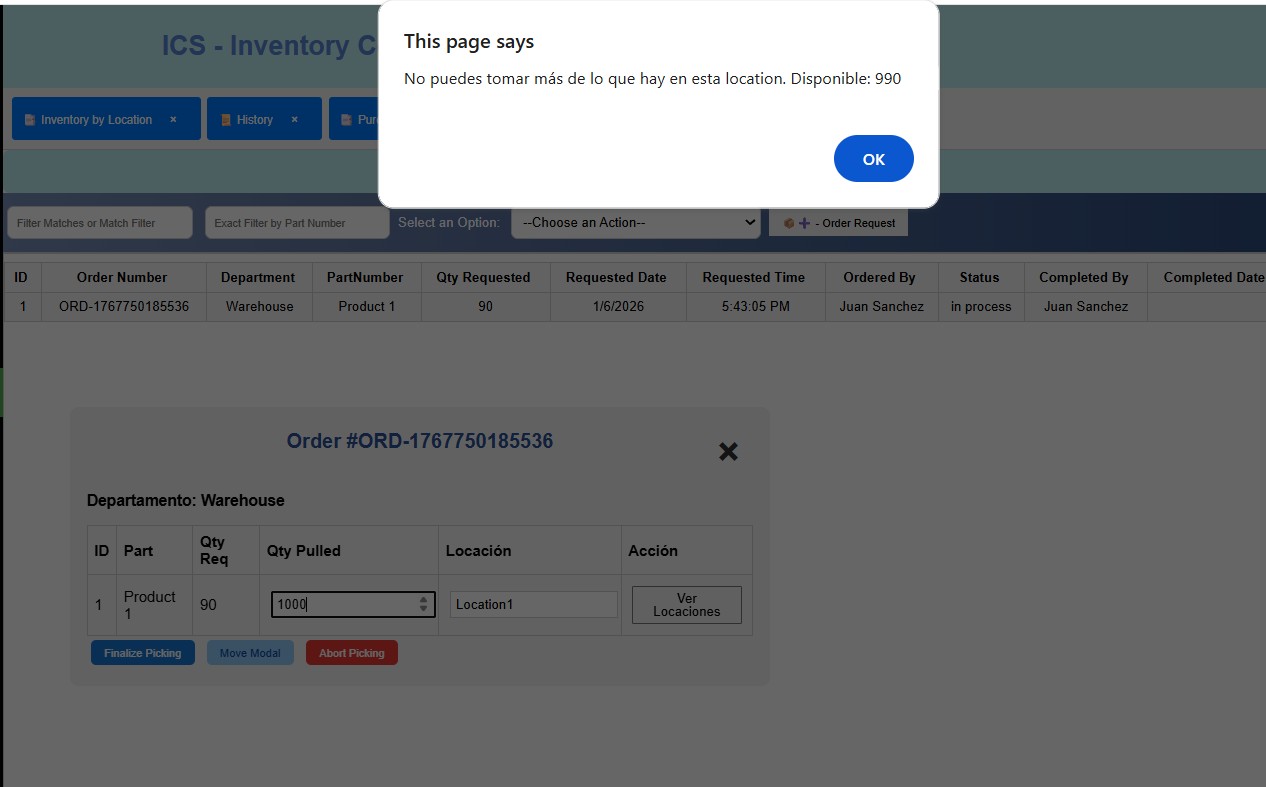
    Strict Validation Logic
    The modal enforces strong rules to prevent incorrect picking:
    • Cannot pull more than the available quantity
    • Cannot pull more than what the order requires
    • If the user tries to send less, the system asks for confirmation
    • If the selected location runs out, the system alerts the user and suggests another location
    • All changes are validated in real time

    This prevents mistakes and ensures accurate inventory control.

    Completion Workflow
    Once the order is fulfilled:
    • The order is marked as Completed in the Order Request table
    • The actual quantity pulled is recorded
    • The inventory of the selected location is adjusted in real time
    • A detailed entry is written to the History module, including:
      – Part number
      – Location used
      – Quantity taken
      – User who performed the action
      – Timestamp
      – Order number
      – Any notes or exceptions

    This guarantees full traceability for audits and operational reviews.

    Why This Modal Is Critical
    The Picking Orders / Replacement modal ensures:
    • FIFO‑accurate picking
    • No double‑assignments
    • No over‑picking
    • No invalid locations
    • Full traceability
    • Real‑time inventory accuracy
    • A smooth, controlled workflow for production support

    It is one of the most intelligent and operationally important components of the ICS system.
  • ICS – Módulo de Órdenes de Picking / Reemplazo (Resumen)

    El modal de Órdenes de Picking / Reemplazo es la interfaz operativa utilizada para cumplir solicitudes internas de material generadas por el módulo de Solicitudes de Orden. Está diseñado para garantizar precisión, aplicar lógica FIFO, evitar conflictos entre usuarios y mantener trazabilidad completa de cada acción de picking.

    Asignación Automática de Órdenes
    Cuando un usuario abre el modal:
    • El sistema asigna automáticamente la orden pendiente más antigua a ese usuario.
    • La orden queda bloqueada, evitando que otros usuarios la tomen al mismo tiempo.

    Esto garantiza equidad, evita duplicaciones y mantiene un flujo de trabajo limpio.

    Interfaz de Picking en Tiempo Real
    El modal muestra toda la información esencial para completar la orden:
    • Nombre del Producto / Número de Parte
    • Cantidad Solicitada
    • Campo para ingresar la Cantidad Real Extraída
    • Ubicación Principal (basada en FIFO)

    El sistema selecciona automáticamente la ubicación disponible más antigua (FIFO) como ubicación predeterminada de picking.

    Selección Flexible de Ubicación
    Aunque el sistema recomienda la ubicación FIFO principal, el usuario no está obligado a usarla. El modal ofrece:
    • Una lista de todas las ubicaciones disponibles para esa parte
    • La capacidad de cambiar a otra ubicación si es necesario
    • Registro automático de quién cambió la ubicación y por qué

    Esto garantiza flexibilidad sin perder responsabilidad.

    Lógica de Validación Estricta
    El modal aplica reglas estrictas para evitar picking incorrecto:
    • No se puede extraer más de la cantidad disponible
    • No se puede extraer más de lo solicitado
    • Si el usuario intenta enviar menos, el sistema solicita confirmación
    • Si la ubicación seleccionada se queda sin inventario, el sistema alerta y sugiere otra ubicación
    • Todos los cambios se validan en tiempo real

    Esto evita errores y garantiza control de inventario preciso.

    Flujo de Finalización
    Una vez completada la orden:
    • La orden se marca como Completada en la tabla de Solicitudes
    • Se registra la cantidad real extraída
    • El inventario de la ubicación seleccionada se ajusta en tiempo real
    • Se escribe una entrada detallada en el módulo de Historial, incluyendo:
      – Número de parte
      – Ubicación utilizada
      – Cantidad extraída
      – Usuario que realizó la acción
      – Marca de tiempo
      – Número de orden
      – Notas o excepciones

    Esto garantiza trazabilidad completa para auditorías y revisiones operativas.

    Por qué este Modal es Crítico
    El modal de Picking / Reemplazo garantiza:
    • Picking preciso basado en FIFO
    • Sin doble asignación
    • Sin sobre‑picking
    • Sin ubicaciones inválidas
    • Trazabilidad completa
    • Exactitud de inventario en tiempo real
    • Flujo de trabajo controlado y eficiente para soporte de producción

    Es uno de los componentes más inteligentes e importantes del sistema ICS.
  • ICS – 拣货单 / 替换模块(摘要)

    拣货单 / 替换模块是用于完成由内部申请单模块生成的物料需求的操作界面。其设计旨在确保准确性、执行 FIFO 逻辑、防止用户冲突,并保持每一次拣货操作的完整可追溯性。

    自动分配订单
    当用户打开该模块时:
    • 系统会自动将最早的待处理订单分配给该用户。
    • 订单会被锁定,防止其他用户同时领取。

    这确保公平性,避免重复处理,并保持清晰的工作流程。

    实时拣货界面
    模块显示完成订单所需的所有关键信息:
    • 产品名称 / 物料编号
    • 需求数量
    • 实际提取数量输入框
    • 主库位(基于 FIFO)

    系统会自动选择最早可用的库位作为默认拣货库位。

    灵活的库位选择
    虽然系统推荐 FIFO 主库位,但用户并不被强制使用。模块提供:
    • 该物料所有可用库位列表
    • 必要时切换到其他库位的能力
    • 自动记录谁更改了库位以及原因

    这确保灵活性,同时保持责任追踪。

    严格的验证逻辑
    模块通过严格规则防止错误拣货:
    • 不可提取超过可用数量
    • 不可提取超过需求数量
    • 若用户提取较少,系统会要求确认
    • 若所选库位库存耗尽,系统会提醒并建议其他库位
    • 所有更改均实时验证

    这防止错误并确保库存控制准确。

    完成流程
    当订单完成时:
    • 订单在申请单表中标记为已完成
    • 记录实际提取数量
    • 所选库位的库存实时更新
    • 系统历史中写入详细记录,包括:
      – 物料编号
      – 使用的库位
      – 提取数量
      – 操作用户
      – 时间戳
      – 订单号
      – 备注或例外情况

    这确保审计和运营审查的完整可追溯性。

    为何此模块至关重要
    拣货 / 替换模块确保:
    • 基于 FIFO 的精准拣货
    • 无重复分配
    • 无超量拣货
    • 无无效库位
    • 完整可追溯性
    • 实时库存准确性
    • 平稳、可控的生产支持流程

    它是 ICS 系统中最智能、最重要的操作模块之一。
  • ICS – Packing List / Inbound Shipment Processing Module (Summary)

    The Packing List module is the starting point for all inbound operations in ICS. It is designed to validate supplier‑provided shipment data, ensure consistency before processing, guide palletizing activities, and feed multiple downstream tables that control receiving, put‑away, and final verification. This module is the foundation of accurate inbound inventory management.

    Supplier Document Integration
    Before a shipment arrives, suppliers typically provide a document (PDF or Excel) containing the expected contents of the load. ICS requires this document in Excel format and in a strict template to ensure consistency and prevent data corruption.

    The system provides a standardized template with the following fields:
    • Shipment Number
    • Load Number
    • Vendor Name
    • PO Number
    • Received Pallet Number (if the supplier ships by pallet)
    • Palletized Pallet Number (assigned internally during processing)
    • Carton Details (optional)
    • Part Number
    • Description
    • Number of Boxes
    • Unit of Measure
    • Units per Box
    • Total Quantity Expected
    • Palletized By (filled later)
    • Palletized Date (filled later)

    This template ensures that every inbound file follows the same structure, enabling automated validation and processing.

    Strict Template Validation
    When a user uploads a packing list, ICS performs multiple layers of validation before accepting the file:

    File name validation
    Ensures the uploaded file matches the expected naming convention.

    Header validation
    Confirms that all required columns exist and are in the correct order.

    Structure validation
    Ensures the file is formatted exactly as the system expects.

    If anything is incorrect, ICS immediately alerts the user with a clear explanation, preventing corrupted or inconsistent data from entering the system.

    Part Number Verification & Error Highlighting
    Even if the template is correct, the system still validates every part number against the master Item List.

    If any part number:
    • is misspelled
    • does not exist
    • does not match the system’s memory

    ICS will:
    • Highlight those rows in red
    • Move them to the top of the table
    • Prevent the user from continuing until they are corrected
    • Suggest the closest matching part number

    This ensures that no invalid product enters the receiving workflow.

    Operational Workflow & Palletizing
    Once the packing list is validated, the user can begin processing the shipment.

    Key features include:
    • Filtering by shipment to work on one load at a time
    • Assigning pallet numbers to each line
    • Marking lines as completed once palletized
    • Automatically updating a secondary table that consolidates items by part number
    • Highlighting items that appear on multiple pallets
    • Alerting users when someone else has already palletized the same item
      – A red icon appears to notify the team

    This workflow supports high‑volume inbound operations with multiple workers.

    Downstream Integration & Real‑Time Updates
    As palletizing progresses, ICS automatically updates:

    1. Consolidated Receiving Table
    A cleaner, compact table that merges all pallets of the same item into a single line.
    This is used for final receiving validation.

    2. Receiving Validation Table
    Tracks:
    • Total expected
    • Total palletized
    • Remaining quantity
    • Shortages or overages
    • RP Number assignment (Receiving Process Number)

    The RP Number is critical because it is used later during Put Away to track the exact inbound batch.

    3. Progress Tracking & Performance Metrics
    ICS calculates:
    • Percentage of the shipment completed
    • Which users have palletized the most
    • Real‑time progress indicators

    This helps supervisors monitor workload and performance.

    User Interaction Features
    Like all ICS tables, the Packing List module includes:
    • Quick Filters
    • Advanced Filters
    • Export to Excel / CSV
    • Row highlighting
    • Active‑cell highlighting
    • Hover effects

    Why This Module Is Critical
    The Packing List module ensures:
    • Supplier data is validated before entering the system
    • No invalid part numbers or corrupted files are processed
    • Palletizing is coordinated, traceable, and error‑free
    • Downstream receiving and put‑away workflows receive clean, structured data
    • Every inbound shipment is fully auditable
    • Inventory accuracy begins at the very first step

    It is the gateway to the entire inbound process and one of the most sophisticated components of ICS.
  • ICS – Módulo de Packing List / Procesamiento de Embarques Entrantes (Resumen)

    El módulo de Packing List es el punto de inicio para todas las operaciones de entrada en ICS. Está diseñado para validar la información proporcionada por el proveedor, asegurar consistencia antes del procesamiento, guiar las actividades de paletización y alimentar múltiples tablas posteriores que controlan recepción, put‑away y verificación final. Este módulo es la base de una gestión de inventario entrante precisa.

    Integración de Documentos del Proveedor
    Antes de que llegue un embarque, los proveedores suelen enviar un documento (PDF o Excel) con el contenido esperado de la carga. ICS requiere este documento en formato Excel y bajo una plantilla estricta para asegurar consistencia y evitar corrupción de datos.

    El sistema proporciona una plantilla estandarizada con los siguientes campos:
    • Número de Embarque
    • Número de Carga
    • Nombre del Proveedor
    • Número de OC
    • Número de Tarima Recibida (si el proveedor envía por tarima)
    • Número de Tarima Paletizada (asignado internamente)
    • Detalles de Cartón (opcional)
    • Número de Parte
    • Descripción
    • Número de Cajas
    • Unidad de Medida
    • Unidades por Caja
    • Cantidad Total Esperada
    • Paletizado Por (llenado después)
    • Fecha de Paletizado (llenado después)

    Esta plantilla garantiza que cada archivo entrante siga la misma estructura, permitiendo validación y procesamiento automatizado.

    Validación Estricta de la Plantilla
    Cuando un usuario sube un packing list, ICS realiza múltiples capas de validación antes de aceptarlo:

    Validación del nombre del archivo
    Asegura que el archivo cumpla con el formato esperado.

    Validación de encabezados
    Confirma que todas las columnas requeridas existan y estén en el orden correcto.

    Validación de estructura
    Asegura que el archivo esté formateado exactamente como el sistema lo requiere.

    Si algo es incorrecto, ICS alerta inmediatamente al usuario con una explicación clara, evitando que datos corruptos entren al sistema.

    Verificación de Número de Parte y Resaltado de Errores
    Incluso si la plantilla es correcta, el sistema valida cada número de parte contra la Lista Maestra de Artículos.

    Si algún número de parte:
    • está mal escrito
    • no existe
    • no coincide con la memoria del sistema

    ICS:
    • Resalta esas filas en rojo
    • Las mueve al inicio de la tabla
    • Impide continuar hasta corregirlas
    • Sugiere el número de parte más cercano

    Esto garantiza que ningún producto inválido entre al flujo de recepción.

    Flujo Operativo y Paletización
    Una vez validado el packing list, el usuario puede comenzar a procesar el embarque.

    Funciones clave:
    • Filtrar por embarque para trabajar una carga a la vez
    • Asignar números de tarima a cada línea
    • Marcar líneas como completadas al paletizar
    • Actualizar automáticamente una tabla secundaria que consolida artículos por número de parte
    • Resaltar artículos que aparecen en múltiples tarimas
    • Alertar cuando otro usuario ya paletizó el mismo artículo
      – Aparece un ícono rojo para notificar al equipo

    Este flujo soporta operaciones de entrada de alto volumen con múltiples trabajadores.

    Integración Posterior y Actualizaciones en Tiempo Real
    A medida que avanza la paletización, ICS actualiza automáticamente:

    1. Tabla Consolidada de Recepción
    Una tabla más limpia que combina todas las tarimas del mismo artículo en una sola línea.
    Se usa para validación final de recepción.

    2. Tabla de Validación de Recepción
    Rastrea:
    • Total esperado
    • Total paletizado
    • Cantidad restante
    • Faltantes o sobrantes
    • Asignación del Número RP (Receiving Process Number)

    El número RP es crítico porque se usa después en Put Away para rastrear el lote entrante exacto.

    3. Seguimiento de Progreso y Métricas
    ICS calcula:
    • Porcentaje completado del embarque
    • Qué usuarios han paletizado más
    • Indicadores de progreso en tiempo real

    Esto ayuda a supervisores a monitorear carga de trabajo y desempeño.

    Funciones de Interacción del Usuario
    Como todas las tablas ICS, el módulo incluye:
    • Filtros Rápidos
    • Filtros Avanzados
    • Exportar a Excel / CSV
    • Resaltado de filas
    • Resaltado de celda activa
    • Efectos hover

    Por qué este Módulo es Crítico
    El módulo de Packing List garantiza:
    • Validación de datos del proveedor antes de entrar al sistema
    • No se procesan números de parte inválidos ni archivos corruptos
    • La paletización es coordinada, trazable y sin errores
    • Los flujos de recepción y put‑away reciben datos limpios y estructurados
    • Cada embarque entrante es completamente auditable
    • La precisión del inventario comienza desde el primer paso

    Es la puerta de entrada de todo el proceso inbound y uno de los componentes más sofisticados de ICS.
  • ICS – 装箱清单 / 入库处理模块(摘要)

    装箱清单模块是 ICS 所有入库操作的起点。其设计旨在验证供应商提供的装运数据、确保处理前的一致性、指导托盘化流程,并为多个下游表提供数据,以控制收货、上架和最终验证。该模块是准确入库管理的基础。

    供应商文件集成
    在货物到达之前,供应商通常会提供一个包含预期装载内容的文件(PDF 或 Excel)。ICS 要求该文件为 Excel 格式,并遵循严格的模板,以确保一致性并防止数据损坏。

    系统提供的标准化模板包含以下字段:
    • 装运编号
    • 载荷编号
    • 供应商名称
    • 采购订单号
    • 收到的托盘编号(若供应商按托盘发货)
    • 托盘化托盘编号(内部处理时分配)
    • 箱体详情(可选)
    • 物料编号
    • 描述
    • 箱数
    • 计量单位
    • 每箱数量
    • 预期总数量
    • 托盘化人员(稍后填写)
    • 托盘化日期(稍后填写)

    该模板确保所有入库文件遵循相同结构,从而实现自动化验证与处理。

    严格的模板验证
    当用户上传装箱清单时,ICS 会在接受文件前执行多层验证:

    文件名验证
    确保文件名符合预期格式。

    表头验证
    确认所有必需列存在且顺序正确。

    结构验证
    确保文件格式完全符合系统要求。

    若有任何错误,ICS 会立即提醒用户并提供清晰说明,防止损坏或不一致的数据进入系统。

    物料编号验证与错误高亮
    即使模板正确,系统仍会将每个物料编号与主物料清单进行比对。

    若某个物料编号:
    • 拼写错误
    • 不存在
    • 与系统记录不匹配

    ICS 将:
    • 将该行标红
    • 移动到表格顶部
    • 阻止继续处理直到修正
    • 建议最接近的物料编号

    确保无无效物料进入收货流程。

    操作流程与托盘化
    装箱清单验证通过后,用户即可开始处理装运。

    关键功能包括:
    • 按装运编号过滤,一次处理一批
    • 为每行分配托盘编号
    • 托盘化完成后标记行状态
    • 自动更新二级表,将相同物料的托盘合并
    • 高亮显示出现在多个托盘中的物料
    • 当其他用户已托盘化相同物料时提醒
      – 显示红色图标提醒团队

    该流程支持多员工的高容量入库操作。

    下游集成与实时更新
    随着托盘化进度推进,ICS 会自动更新:

    1. 收货合并表
    将相同物料的所有托盘合并为一行,用于最终收货验证。

    2. 收货验证表
    跟踪:
    • 预期数量
    • 已托盘化数量
    • 剩余数量
    • 缺失或超量
    • RP 编号(Receiving Process Number)分配

    RP 编号在后续上架流程中用于追踪入库批次。

    3. 进度跟踪与绩效指标
    ICS 计算:
    • 装运完成百分比
    • 托盘化最多的用户
    • 实时进度指示器

    帮助主管监控工作量与绩效。

    用户交互功能
    与所有 ICS 表格一样,装箱清单模块包含:
    • 快速筛选
    • 高级筛选
    • 导出至 Excel / CSV
    • 行高亮
    • 活动单元格高亮
    • 悬停效果

    为何此模块至关重要
    装箱清单模块确保:
    • 供应商数据在进入系统前得到验证
    • 无无效物料编号或损坏文件被处理
    • 托盘化过程协调、有迹可循且无错误
    • 下游收货与上架流程接收干净、结构化的数据
    • 每批入库货物均可完全审计
    • 库存准确性从第一步就开始建立

    它是整个入库流程的入口,也是 ICS 最复杂的组件之一。
  • ICS – Incoming Load Details Module (Full Summary with Enhanced LPN Printing System)

    The Incoming Load Details module is the second stage of the inbound workflow in ICS, directly fed by the Packing List module. This is where the receiving team confirms quantities, assigns LPNs, validates discrepancies, and finalizes the shipment for procurement and warehouse operations. It is a highly controlled, real‑time environment designed for accuracy, traceability, and operational consistency.

    LPN Generation & Assignment
    At the core of this module is a flexible and powerful LPN (License Plate Number) management system. Users can:
    • Generate all LPNs at once for the entire filtered shipment
    • Print LPN labels for already‑generated LPNs
    • Print blank labels for manual assignment
    • Manually enter LPNs line‑by‑line if preferred

    This allows the warehouse to choose the workflow that best fits the operation — pre‑printing labels, printing on demand, or entering LPNs manually.

    Once an LPN is assigned:
    • The line’s status changes from Pending to Confirmed
    • The status turns green to indicate successful confirmation

    Selective or Bulk Label Printing
    Every print option — whether Print Labels or Print LPNs — includes multiple printing modes:
    • Print only the selected line — ideal for reprinting a damaged or missing label
    • Print all filtered lines — useful when printing labels for an entire shipment or pallet group

    This gives operators full control over exactly which labels they want to generate.

    Multiple Standard Label Sizes
    To avoid restricting the warehouse to a single label format, the system supports a wide range of industry‑standard label sizes, including:
    • 2 × 1
    • 3 × 1
    • 3 × 2
    • 2 × 2
    • 4 × 2
    • 4 × 2.5
    • 4 × 3
    • 5 × 3

    Custom Label Size Support
    Beyond the standard options, the system includes a Custom Size mode.
    Users can enter any width and height, allowing ICS to:
    • Adapt to unusual label formats
    • Support legacy printers
    • Match supplier‑specific label requirements
    • Print on any label stock available in the warehouse

    There are no limitations — the system dynamically adjusts to whatever size the user enters.

    Automatic Content Scaling
    Regardless of the label size chosen — standard or custom — the system automatically adjusts:
    • Barcode or QR code size
    • Font size
    • Layout spacing
    • Margins

    This ensures:
    • The barcode remains scannable
    • The text remains readable
    • The label layout stays clean and professional
    • Nothing gets cut off during printing

    Barcode or QR Code Options
    Each label can be printed using:
    • Barcode (Code128)
    • QR Code

    Users can choose whichever format best fits their scanning equipment or operational workflow. Both formats scale automatically to the selected label size.

    Discrepancy Detection & Color Coding
    The module automatically detects quantity discrepancies:
    • If the expected quantity does not match the received quantity, the system highlights the line in red
    • The quantity field is wrapped in a red indicator
    • The entire shipment is flagged to show that changes occurred

    This ensures procurement and receiving supervisors can immediately identify issues.

    Real‑Time Receiving Data Capture
    Each confirmed line records:
    • Received Date
    • Received Time
    • Received By
    • Notes or comments

    This creates a complete audit trail for every inbound line.

    Put Away Tracking
    The module also captures the final warehouse placement:
    • Put Away By
    • Put Away Date
    • Put Away Time
    • Put Away Location

    This ensures that every item is traceable from supplier → receiving → pallet → final rack location.

    Integration With Incoming Load Summary
    As each line is confirmed:
    • The parent table Incoming Load updates in real time
    • It calculates the percentage received
    • It shows whether the shipment is fully received or short
    • If the total received is less than expected, the summary row is highlighted in light red

    This gives procurement and supervisors a clear overview of shipment completion.

    Operational Buttons & Permissions
    The module includes several high‑impact actions:
    • Generate LPNs
    • Clear LPNs
    • Print LPN labels
    • Print blank labels
    • Confirm individual lines
    • Confirm all lines
    • Delete shipment data (restricted to supervisors/managers/owners)

    All actions are permission‑controlled based on the logged‑in user’s role.

    Change Tracking & Historical Accuracy
    If a user modifies a line after it was previously confirmed:
    • The system logs the change
    • It records what the quantity was before and after
    • It preserves a full history of adjustments

    This ensures complete transparency and prevents silent changes.

    User Interaction Features
    Like all ICS tables, Incoming Load Details includes:
    • Quick Filters
    • Advanced Filters
    • Export to Excel / CSV
    • Row highlighting
    • Active‑cell highlighting
    • Hover effects

    Why This Module Is Critical
    Incoming Load Details ensures:
    • Accurate receiving
    • Clean LPN assignment
    • Full discrepancy tracking
    • Real‑time updates to procurement
    • Complete traceability for audits
    • Controlled access to sensitive actions
    • A smooth transition into Put Away and final inventory placement

    It is the central verification point of the inbound process, ensuring that what was expected, what was received, and what was stored all match perfectly.
  • ICS – Módulo de Detalles de Cargas Entrantes (Resumen Completo con Sistema Mejorado de Impresión de LPN)

    El módulo de Detalles de Cargas Entrantes es la segunda etapa del flujo inbound en ICS, alimentado directamente por el módulo de Packing List. Aquí es donde el equipo de recepción confirma cantidades, asigna LPNs, valida discrepancias y finaliza el embarque para compras y operaciones de almacén. Es un entorno altamente controlado, en tiempo real, diseñado para precisión, trazabilidad y consistencia operativa.

    Generación y Asignación de LPN
    En el núcleo de este módulo existe un sistema flexible y potente de gestión de LPN (License Plate Number). Los usuarios pueden:
    • Generar todos los LPNs de una sola vez para el embarque filtrado
    • Imprimir etiquetas LPN para los LPNs ya generados
    • Imprimir etiquetas en blanco para asignación manual
    • Ingresar LPNs manualmente línea por línea si se prefiere

    Esto permite al almacén elegir el flujo que mejor se adapte a la operación — pre‑impresión, impresión bajo demanda o entrada manual.

    Una vez asignado un LPN:
    • El estatus de la línea cambia de Pendiente a Confirmado
    • El estatus se vuelve verde indicando confirmación exitosa

    Impresión Selectiva o Masiva
    Cada opción de impresión — Print Labels o Print LPNs — incluye múltiples modos:
    • Imprimir solo la línea seleccionada
    • Imprimir todas las líneas filtradas

    Esto da control total al operador sobre qué etiquetas generar.

    Múltiples Tamaños Estándar de Etiquetas
    El sistema soporta una amplia variedad de tamaños estándar, incluyendo:
    • 2 × 1
    • 3 × 1
    • 3 × 2
    • 2 × 2
    • 4 × 2
    • 4 × 2.5
    • 4 × 3
    • 5 × 3

    Soporte para Tamaños Personalizados
    Además, el sistema incluye un modo de Tamaño Personalizado. Los usuarios pueden ingresar cualquier ancho y alto, permitiendo que ICS:
    • Se adapte a formatos inusuales
    • Soporte impresoras antiguas
    • Cumpla requisitos específicos de proveedores
    • Imprima en cualquier tipo de etiqueta disponible

    No hay limitaciones — el sistema se ajusta dinámicamente al tamaño ingresado.

    Escalado Automático del Contenido
    Sin importar el tamaño elegido, el sistema ajusta automáticamente:
    • Tamaño del código de barras o QR
    • Tamaño de fuente
    • Espaciado del diseño
    • Márgenes

    Esto garantiza:
    • Códigos escaneables
    • Texto legible
    • Diseño limpio y profesional
    • Nada se corta al imprimir

    Opciones de Código de Barras o QR
    Cada etiqueta puede imprimirse como:
    • Código de Barras (Code128)
    • Código QR

    Ambos formatos se escalan automáticamente al tamaño seleccionado.

    Detección de Discrepancias y Colores
    El módulo detecta automáticamente discrepancias de cantidad:
    • Si la cantidad esperada no coincide con la recibida, la línea se marca en rojo
    • El campo de cantidad se resalta
    • El embarque completo se marca indicando cambios

    Esto permite identificar problemas inmediatamente.

    Captura de Datos de Recepción en Tiempo Real
    Cada línea confirmada registra:
    • Fecha de Recepción
    • Hora de Recepción
    • Recibido Por
    • Notas

    Esto crea una pista de auditoría completa.

    Seguimiento de Put Away
    El módulo también captura la ubicación final en almacén:
    • Put Away Por
    • Fecha de Put Away
    • Hora de Put Away
    • Ubicación de Put Away

    Esto asegura trazabilidad completa desde proveedor → recepción → tarima → rack final.

    Integración con Incoming Load Summary
    A medida que se confirman líneas:
    • La tabla padre se actualiza en tiempo real
    • Calcula el porcentaje recibido
    • Indica si el embarque está completo o corto
    • Si se recibió menos de lo esperado, la fila se marca en rojo claro

    Esto da a compras y supervisores una vista clara del progreso.

    Botones Operativos y Permisos
    El módulo incluye acciones clave:
    • Generar LPNs
    • Limpiar LPNs
    • Imprimir etiquetas LPN
    • Imprimir etiquetas en blanco
    • Confirmar líneas individuales
    • Confirmar todas las líneas
    • Borrar datos del embarque (solo supervisores/gerentes/propietarios)

    Todas las acciones están controladas por permisos según el rol del usuario.

    Registro de Cambios y Exactitud Histórica
    Si un usuario modifica una línea ya confirmada:
    • El sistema registra el cambio
    • Guarda la cantidad antes y después
    • Mantiene historial completo de ajustes

    Esto evita cambios silenciosos y garantiza transparencia total.

    Funciones de Interacción del Usuario
    Como todas las tablas ICS, incluye:
    • Filtros Rápidos
    • Filtros Avanzados
    • Exportar a Excel / CSV
    • Resaltado de filas
    • Resaltado de celda activa
    • Efectos hover

    Por qué este Módulo es Crítico
    Incoming Load Details garantiza:
    • Recepción precisa
    • Asignación limpia de LPNs
    • Seguimiento completo de discrepancias
    • Actualizaciones en tiempo real para compras
    • Trazabilidad completa para auditorías
    • Acceso controlado a acciones sensibles
    • Transición fluida hacia Put Away y ubicación final

    Es el punto central de verificación del proceso inbound, asegurando que lo esperado, lo recibido y lo almacenado coincidan perfectamente.
  • ICS – 入库明细模块(含增强型 LPN 打印系统的完整摘要)

    入库明细模块是 ICS 入库流程的第二阶段,由装箱清单模块直接驱动。在这里,收货团队确认数量、分配 LPN、验证差异,并为采购和仓储操作最终确认装运。该模块是一个高度受控的实时环境,旨在确保准确性、可追溯性和操作一致性。

    LPN 生成与分配
    模块核心是一个灵活且强大的 LPN(托盘号)管理系统。用户可以:
    • 一次性为整个过滤后的装运生成所有 LPN
    • 打印已生成的 LPN 标签
    • 打印空白标签用于手动分配
    • 按行手动输入 LPN

    这允许仓库根据需要选择最佳流程:预打印、按需打印或手动输入。

    一旦 LPN 被分配:
    • 行状态从“待处理”变为“已确认”
    • 状态变为绿色以表示成功确认

    选择性或批量打印
    所有打印选项均支持多种模式:
    • 仅打印所选行
    • 打印所有过滤行

    让操作员完全掌控需要生成哪些标签。

    多种标准标签尺寸
    系统支持多种行业标准尺寸,包括:
    • 2 × 1
    • 3 × 1
    • 3 × 2
    • 2 × 2
    • 4 × 2
    • 4 × 2.5
    • 4 × 3
    • 5 × 3

    自定义标签尺寸
    系统还支持自定义尺寸模式。 用户可输入任意宽度和高度,使 ICS 能够:
    • 适应非常规标签格式
    • 支持旧式打印机
    • 满足供应商特定要求
    • 使用仓库中任何可用标签材料

    系统会根据输入尺寸自动调整,无任何限制。

    内容自动缩放
    无论选择何种尺寸,系统都会自动调整:
    • 条码或二维码大小
    • 字体大小
    • 布局间距
    • 边距

    确保:
    • 条码可扫描
    • 文本清晰可读
    • 布局专业整洁
    • 打印时不会被裁切

    条码或二维码选项
    每个标签可选择:
    • 条码(Code128)
    • 二维码

    两种格式都会根据标签尺寸自动缩放。

    差异检测与颜色标识
    模块会自动检测数量差异:
    • 若预期数量与收到数量不符,该行标红
    • 数量字段加红框
    • 整个装运被标记为有变动

    确保采购与收货主管能立即发现问题。

    实时收货数据记录
    每行确认后记录:
    • 收货日期
    • 收货时间
    • 收货人
    • 备注

    形成完整的审计轨迹。

    上架跟踪
    模块还记录最终上架信息:
    • 上架人
    • 上架日期
    • 上架时间
    • 上架库位

    确保物料从供应商 → 收货 → 托盘 → 最终库位全程可追踪。

    与入库汇总表集成
    每行确认后:
    • 上级表实时更新
    • 计算收货百分比
    • 显示装运是否完成或短缺
    • 若收到数量少于预期,汇总行标浅红色

    为采购与主管提供清晰的进度概览。

    操作按钮与权限
    模块包含多项关键操作:
    • 生成 LPN
    • 清除 LPN
    • 打印 LPN 标签
    • 打印空白标签
    • 确认单行
    • 确认所有行
    • 删除装运数据(仅限主管/经理/管理员)

    所有操作均基于用户角色进行权限控制。

    变更记录与历史准确性
    若用户修改已确认的行:
    • 系统记录变更
    • 保存修改前后数量
    • 保留完整调整历史

    确保透明度并防止未记录的更改。

    用户交互功能
    与所有 ICS 表格一致,包含:
    • 快速筛选
    • 高级筛选
    • 导出至 Excel / CSV
    • 行高亮
    • 活动单元格高亮
    • 悬停效果

    为何此模块至关重要
    入库明细模块确保:
    • 收货准确
    • LPN 分配清晰
    • 差异跟踪完整
    • 实时更新采购
    • 完整可审计性
    • 对敏感操作的权限控制
    • 顺利过渡到上架与最终库位

    它是入库流程的核心验证点,确保预期、收到与存储的数据完全一致。
  • ICS – Physical Counts Module (Summary)

    The Physical Counts module is designed to support accurate cycle counts, full inventory audits, and reconciliation processes. It provides a controlled, validated, and fully traceable environment where users can record counted quantities, compare them against system values, and prepare the data for final approval by inventory and finance teams.

    Data Fields Captured in the Physical Counts Table
    Each physical count entry includes the following fields:
    • Tag Number
    • Part Number
    • Description
    • Counted Quantity
    • Count Date
    • Count Time
    • Location Counted
    • Counted By
    • Discrepancy (difference between counted vs. system quantity)
    • System Quantity (what the system had before the count)
    • Notes (editable for comments such as “duplicate,” “ignored,” “damaged,” etc.)

    These fields provide a complete audit trail for every counted item.

    Modal‑Based Counting Workflow
    Counts are entered through a dedicated modal form that ensures accuracy and prevents invalid data entry.

    Validation Logic
    When the user enters a part number:
    • The system validates it against the Item List
    • If the part number is invalid, the system blocks the entry and alerts the user
    • Only valid part numbers are allowed

    Once validated, the modal automatically displays:
    • Unit of Measure
    • Description
    • Next Tag Number assigned to the user

    The user then enters:
    • Counted Quantity
    • Location

    After saving, the entry is written to the Physical Counts table.

    Tag Number Logic (Sequential & User‑Specific)
    Tag Numbers are essential for audit tracking. ICS assigns Tag Numbers using the following rules:
    • Each user receives their own sequence
    • Tag numbers include the user’s initials
    • Numbers increment sequentially (e.g., JS‑10000, JS‑10001, JS‑10002…)
    • No duplicates are allowed

    Tag numbers help auditors trace who counted what, and in what order.

    User Permissions & Visibility
    The module enforces strict visibility rules:
    • Users can only see their own counts — prevents bias or influence during the counting process
    • Administrators can see all counts — necessary for reconciliation, auditing, and oversight

    This separation ensures integrity during the counting phase.

    Discrepancy Tracking
    The system automatically compares:
    • Counted Quantity
    • System Quantity

    If there is a difference:
    • The discrepancy is calculated
    • The row is highlighted
    • The system quantity is displayed for reference

    This makes it easy to identify items that require investigation or recounting.

    Reconciliation Workflow (Controlled & Manual)
    The Physical Counts module does not automatically update the Inventory By Location table — intentionally.

    Before updating inventory, the reconciliation team must:
    • Review all discrepancies
    • Compare counts with system values
    • Discuss variances with finance
    • Approve or reject adjustments
    • Perform recounts if necessary

    Only after approval is the final inventory uploaded to replace the existing Inventory By Location data.

    This ensures financial accuracy and prevents accidental inventory corruption.

    Export Tools
    The module includes:
    • Quick Filters
    • Advanced Filters
    • Export to Excel / CSV

    These tools allow teams to export the count results for reconciliation meetings, audits, or external review.

    User Interaction Features
    Like all ICS tables, the Physical Counts module includes:
    • Row highlighting
    • Active‑cell highlighting
    • Hover effects
    • Clean, spreadsheet‑like interaction

    Why This Module Is Critical
    The Physical Counts module ensures:
    • Accurate cycle counts
    • Full traceability of who counted what
    • Controlled validation of part numbers
    • Clear discrepancy identification
    • Proper reconciliation with finance
    • A clean, auditable record of all count activity
    • Protection against accidental inventory changes

    It is the backbone of the ICS audit process and a key component for maintaining inventory accuracy and financial integrity.
  • ICS – Módulo de Conteos Físicos (Resumen)

    El módulo de Conteos Físicos está diseñado para soportar conteos cíclicos precisos, auditorías completas de inventario y procesos de conciliación. Proporciona un entorno controlado, validado y completamente trazable donde los usuarios pueden registrar cantidades contadas, compararlas con los valores del sistema y preparar los datos para la aprobación final por parte de los equipos de inventario y finanzas.

    Campos Capturados en la Tabla de Conteos Físicos
    Cada entrada de conteo físico incluye los siguientes campos:
    • Número de Tag
    • Número de Parte
    • Descripción
    • Cantidad Contada
    • Fecha del Conteo
    • Hora del Conteo
    • Ubicación Contada
    • Contado Por
    • Discrepancia (diferencia entre contado vs. cantidad del sistema)
    • Cantidad del Sistema
    • Notas (editable para comentarios como “duplicado”, “ignorado”, “dañado”, etc.)

    Estos campos proporcionan una pista de auditoría completa para cada artículo contado.

    Flujo de Trabajo Basado en Modal
    Los conteos se ingresan mediante un formulario modal dedicado que garantiza precisión y evita entradas inválidas.

    Lógica de Validación
    Cuando el usuario ingresa un número de parte:
    • El sistema lo valida contra la Lista de Artículos
    • Si el número de parte es inválido, el sistema bloquea la entrada y alerta al usuario
    • Solo se permiten números de parte válidos

    Una vez validado, el modal muestra automáticamente:
    • Unidad de Medida
    • Descripción
    • Siguiente Número de Tag asignado al usuario

    El usuario luego ingresa:
    • Cantidad Contada
    • Ubicación

    Después de guardar, la entrada se escribe en la tabla de Conteos Físicos.

    Lógica del Número de Tag (Secuencial y Específica por Usuario)
    Los números de Tag son esenciales para auditoría. ICS los asigna bajo estas reglas:
    • Cada usuario recibe su propia secuencia
    • Los números incluyen las iniciales del usuario
    • Los números incrementan secuencialmente (ej. JS‑10000, JS‑10001…)
    • No se permiten duplicados

    Los números de Tag ayudan a rastrear quién contó qué y en qué orden.

    Permisos y Visibilidad del Usuario
    El módulo aplica reglas estrictas de visibilidad:
    • Los usuarios solo pueden ver sus propios conteos — evita sesgos o influencia
    • Los administradores pueden ver todos los conteos — necesario para conciliación y auditoría

    Esta separación garantiza integridad durante el proceso de conteo.

    Seguimiento de Discrepancias
    El sistema compara automáticamente:
    • Cantidad Contada
    • Cantidad del Sistema

    Si hay diferencia:
    • La discrepancia se calcula
    • La fila se resalta
    • La cantidad del sistema se muestra como referencia

    Esto facilita identificar artículos que requieren investigación o reconteo.

    Flujo de Conciliación (Controlado y Manual)
    El módulo NO actualiza automáticamente la tabla de Inventario por Ubicación — intencionalmente.

    Antes de actualizar inventario, el equipo de conciliación debe:
    • Revisar discrepancias
    • Comparar conteos con valores del sistema
    • Discutir variaciones con finanzas
    • Aprobar o rechazar ajustes
    • Realizar reconteos si es necesario

    Solo después de la aprobación se carga el inventario final para reemplazar los datos existentes.

    Esto garantiza precisión financiera y evita corrupción accidental del inventario.

    Herramientas de Exportación
    El módulo incluye:
    • Filtros Rápidos
    • Filtros Avanzados
    • Exportar a Excel / CSV

    Estas herramientas permiten exportar resultados para reuniones de conciliación, auditorías o revisiones externas.

    Funciones de Interacción del Usuario
    Como todas las tablas ICS, incluye:
    • Resaltado de filas
    • Resaltado de celda activa
    • Efectos hover
    • Interacción tipo hoja de cálculo

    Por qué este Módulo es Crítico
    El módulo de Conteos Físicos garantiza:
    • Conteos cíclicos precisos
    • Trazabilidad completa de quién contó qué
    • Validación estricta de números de parte
    • Identificación clara de discrepancias
    • Conciliación adecuada con finanzas
    • Registro limpio y auditable de toda actividad
    • Protección contra cambios accidentales en inventario

    Es la columna vertebral del proceso de auditoría de ICS y un componente clave para mantener la precisión del inventario y la integridad financiera.
  • ICS – 实物盘点模块(摘要)

    实物盘点模块旨在支持精确的循环盘点、完整的库存审计和对账流程。它提供一个受控、验证且完全可追溯的环境,让用户记录盘点数量、与系统数量进行比较,并为库存与财务团队的最终批准做好准备。

    盘点表中记录的数据字段
    每条盘点记录包含以下字段:
    • 标签编号(Tag Number)
    • 物料编号
    • 描述
    • 盘点数量
    • 盘点日期
    • 盘点时间
    • 盘点库位
    • 盘点人
    • 差异(盘点数量 vs 系统数量)
    • 系统数量
    • 备注(可编辑,如“重复”、“忽略”、“损坏”等)

    这些字段为每个盘点项目提供完整的审计轨迹。

    基于 Modal 的盘点流程
    盘点通过专用的 modal 表单输入,确保准确性并防止无效数据录入。

    验证逻辑
    当用户输入物料编号时:
    • 系统会根据物料清单进行验证
    • 若无效,系统会阻止录入并提醒用户
    • 仅允许有效物料编号

    验证通过后,modal 会自动显示:
    • 计量单位
    • 描述
    • 分配给该用户的下一个标签编号

    用户随后输入:
    • 盘点数量
    • 库位

    保存后,记录写入盘点表。

    标签编号逻辑(顺序且用户专属)
    标签编号对审计至关重要。ICS 按以下规则分配:
    • 每个用户拥有自己的编号序列
    • 标签编号包含用户姓名缩写
    • 编号按顺序递增(如 JS‑10000, JS‑10001…)
    • 不允许重复

    标签编号帮助审计人员追踪谁在何时盘点了什么。

    用户权限与可见性
    模块执行严格的可见性规则:
    • 用户只能看到自己的盘点记录 — 防止偏见或相互影响
    • 管理员可查看所有记录 — 用于对账与审计

    这种分离确保盘点阶段的公正性。

    差异跟踪
    系统自动比较:
    • 盘点数量
    • 系统数量

    若存在差异:
    • 自动计算差异
    • 高亮显示该行
    • 显示系统数量作为参考

    便于快速识别需要调查或复盘的项目。

    对账流程(受控且手动)
    盘点模块不会自动更新“按库位库存”表 — 这是有意设计的。

    在更新库存前,对账团队必须:
    • 审查所有差异
    • 将盘点与系统数量进行比较
    • 与财务部门讨论差异
    • 批准或拒绝调整
    • 必要时进行复盘

    只有在批准后,最终库存才会上传并替换现有数据。

    这确保财务准确性并防止库存数据被意外破坏。

    导出工具
    模块包含:
    • 快速筛选
    • 高级筛选
    • 导出至 Excel / CSV

    这些工具便于团队导出盘点结果用于对账会议、审计或外部审查。

    用户交互功能
    与所有 ICS 表格一致,包含:
    • 行高亮
    • 活动单元格高亮
    • 悬停效果
    • 类电子表格交互方式

    为何此模块至关重要
    实物盘点模块确保:
    • 精确的循环盘点
    • 完整的盘点责任追踪
    • 严格的物料编号验证
    • 清晰的差异识别
    • 与财务部门的正确对账
    • 干净、可审计的盘点记录
    • 防止库存被意外修改

    它是 ICS 审计流程的核心,也是维持库存准确性与财务完整性的关键组件。
  • For New information
📥

Receiving (PO Controlled)

  • Open PO validation
  • Over-receiving prevention
  • Partial receipts management
  • Smart auto-fill and full history
🚚

Replenishment & Advanced Picking

  • Inventory reservation by user
  • Automatic assignment of oldest order
  • Work-in-progress persistence
  • Automatic adjustments and full traceability
🔧

Issue / Material Consumption

  • Strict validation of part, location and quantity
  • Location FIFO logic
  • Negative inventory prevention
  • Detailed movement log
🔄

Sub-Transfer (Internal Moves)

  • Up to 10 moves in a single operation
  • Quantity validation
  • Double adjustment (source/destination)
  • Auditable history with labels
📊

Inventory & Web Reports

  • On-Hand and Inventory by Location
  • History and Orders Web Reports
  • Initial KPIs and dashboards
  • Export to Excel / PDF
🔐

User Permissions (RBAC)

  • Button-level access control
  • Dynamic show/hide per user
  • Bulk upload via Excel
  • Table editing and advanced filters
📦

Dual‑Layer Incoming Load Processing

  • Staging layer for raw file intake
  • Strict validation of file name & column sequence
  • Visual error flags for mismatched Part Numbers
  • Shipment integrity enforcement (no duplicates)
  • Quality‑gate logic before LPN generation
📈

Dashboard & KPIs

  • Real‑time KPIs and trends
  • 10 summary cards with live data
  • Interactive charts (bar, line, donut)
  • Operational insights by user and type
📦

Inventory On‑Hand

  • Excel‑style interaction
  • Quick & advanced filters
  • Hover, row & cell highlighting
  • Export to Excel / CSV
📍

Inventory by Location

  • Real‑time location accuracy
  • Integrated Ship / Receive / Sub‑Transfer
  • Bulk import & validation
  • Excel‑style UI with full traceability
🗂️

Item & Location Master Data

  • Strict validation for all operations
  • Bulk import of items & locations
  • Active / inactive status control
  • Excel‑style interaction & export
🧾

Purchase Orders

  • Bulk import & template generation
  • Dynamic status (Ordered / Partial / Completed)
  • Strict receiving validation
  • Excel‑style UI with full history
📨

Order Request Management

  • Modal‑based order creation
  • Dynamic status workflow
  • Strict validation & real‑time updates
  • Export & full audit trail
🛒

Picking Orders / Replacement

  • Automatic assignment of oldest order
  • FIFO‑based location logic
  • Strict picking validation
  • Full traceability in History
🏷️

Incoming Loads Verification

  • LPN generation & assignment
  • Multi‑size label printing
  • Discrepancy detection & color coding
  • Real‑time receiving & put‑away tracking
🧮

Physical Counts

  • Modal‑based counting workflow
  • User‑specific tag number sequences
  • Discrepancy tracking & highlighting
  • Controlled reconciliation process
📜

Inventory History

  • Full audit trail of all movements
  • Quick & advanced filters
  • Excel‑style interaction
  • Export for audits & investigations

Business Benefits

ICS is not just software; it is a way to operate your warehouse with discipline and clarity.

Fewer operational errors

Validations at each step prevent over-receiving, wrong locations and incorrect quantities.

Complete inventory control

Each movement updates on-hand and history in a consistent, auditable way.

Faster workflows

Smart auto-fill, guided flows and Excel-like tables speed up daily operations.

Easier training

Clear screens and messages reduce the learning curve for new operators.

Higher Data Integrity on Inbound Loads

The new dual‑layer Incoming Load Processing module enforces file structure, validates Part Numbers, prevents duplicate shipments and blocks incorrect data before it reaches operational workflows.

Licensing & Pricing

Flexible monthly licensing that adapts to the size and needs of your operation.

ICS – Standard Package

10 user licenses: $1,500 – $3,500 USD / month

Talk about your operation

Contact & Next Steps

Share a bit about your operation and we will explore how ICS can help you.

Sanchez Web Apps LLC

We design inventory and warehouse solutions with real-world logic and a modern user experience.

Email: sanchezwebappsllc@yahoo.com

Location: Los Angeles area, California, USA

Screens & Workflow Examples

ICS includes professional tables, draggable modals and web reports ready for real operations.